

Resource management represents a major challenge for project managers seeking to optimize the performance of their teams. Without the right management software, it becomes difficult to match supply and demand while meeting deadlines.
Historically, project managers turned to spreadsheets to get an overview of their resources. However, these solutions quickly become a nightmare to maintain and a source of errors. Essential questions remain unanswered: what is everyone’s workload today? Who is available? When should new people be recruited?
If you’re looking for these answers and want to get started with resource management the right way, you’ve come to the right place. We’ve put together a list of the best resource management tools, each with its own special features, to help you keep your cool even when managing a large pool of resources.
Why is resource management software essential?
Did you know that resource management has remained the top challenge for project managers for several years running? What’s more, poor resource management has seen the biggest increase since 2018 and now occupies 2nd place as the most significant challenge. By neglecting the importance of balancing resources, companies have a hazy idea of available assets and end up in a vicious circle of resource rigidity.
Poor resource management often results in understaffed or overstaffed projects, damaging the end result and even derailing agreements. This is the consequence of an inability to allocate, plan and level resources correctly, often triggered by a lack of appropriate tools.
The benefits of using a resource management solution are numerous:
- Create a realistic schedule to manage projects efficiently
- Forecasting capacity and anticipating needs
- Ensuring the best use of available resources
- Distribute workloads fairly
- Optimizing the use of existing resources
- Resolving resource conflicts
- Prevent resources from lying idle
- Know when to recruit new employees
Nothing improves business processes and performance more than a well thought-out resource management strategy, accompanied by the software that helps teams implement it.
Top 10 resource management software
The following tools are exceptional from the point of view of resource and workload management, and can significantly improve the efficiency of ongoing project operations. Let’s find out more.
1. Teambook – A modern solution for collaborative resource management
Teambook stands out as a resource management software particularly suited to agile teams. This management solution offers an intuitive approach to planning and tracking the allocation of resources between teams.
The tool helps teams capture and visualize available capacity and optimize task allocation. Thanks to advanced planning tools, Teambook facilitates coordination between different departments and improves resource efficiency.
Key features include :
- Drag-and-drop visual resource planning
- Customizable dashboards to track performance
- Integration with major project management tools
- Medium-term capacity management with visual indicators
- One-click timesheet entry (by copying planning data).
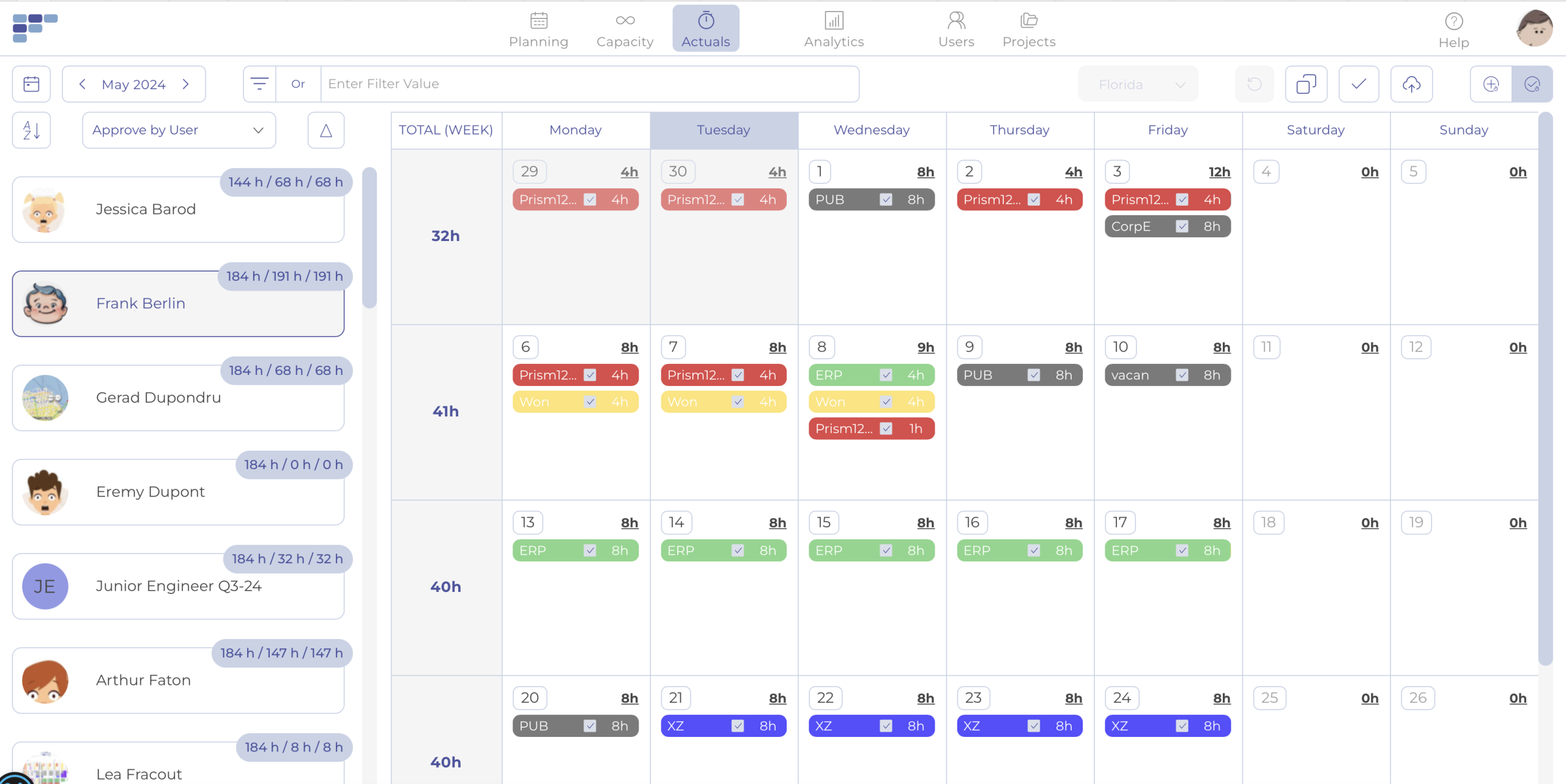
This solution is particularly well suited to medium-sized companies looking to enhance their management capabilities without excessive complexity.
Uniquely, Teambook offers pricing per project pack, for an unlimited number of users! The unbeatable price is just one Euro per project!
2. Forecast – A complete management solution for projects and resources
Forecast is an all-in-one platform that takes you from quotation to invoice with a full spectrum of resource management features for planning, allocating, scheduling and monitoring resources. The combination of project management functionality with workload management, time tracking and the budget tab makes it the perfect replacement for fragmented tools.
Forecast has been designed to meet both long-term and short-term resource planning needs. You can allocate resources to tasks or projects and get an overview of all resource metrics for each team member, now and months in advance – their allocations, workloads, automatically calculated utilization rates and leave.
Zoom-in and zoom-out functionality gives you the flexibility to view resources from a monthly, weekly or daily perspective. The level of connectivity is impressive, as you can drill down from the heat map to individual tasks to see their progress.
Project managers can quickly identify who is overbooked, available or on vacation to plan future projects, while executives will benefit from company-wide utilization rates and forecast resource requirements.
Discover our article dedicated to Forecast vs Teambook.
3. Runn – Resource planning and forecasting software
Runn is a modern resource management application that provides in-depth information on your entire workforce, enabling you to plan resources intelligently. Despite its relative newness on the market, Runn features an elegant design and excellent opportunities to enhance your resource management strategy.
You can analyze each team member’s revenue, capacity and utilization in detail, and view the percentage of time assigned and how much is billable or non-billable in a daily, weekly or monthly view.
With Runn, you can quickly find the right resources by filtering the scheduler to see only people in a specific role, team or with a certain tag. What makes resource planning so much easier is the ability to see how many hours each person has available on any given day.
Prices start at €10 per user per month, with a free unlimited plan for up to 5 users.
4. Paymo – Resource planning software for teams
Paymo is a project management tool which, in addition to task management, native time tracking and invoicing, also includes robust resource planning and scheduling modules. The tool combines team capacity, workload and availability on a visual timeline to help you allocate resources accordingly.
Of particular note is the intelligent scheduling feature. Provisional bookings are automatically set to the date ranges of previous jobs. All that remains is to specify the number of working hours to convert it into an actual booking.
The remaining hours column will also give you the necessary visibility of your team’s capacity, even at project level, to know how many bookable hours are still available.
Prices start at €9.95 per user per month. 14-day free trial available.
5. 10,000 ft – Staff scheduling with Smartsheet
At the heart of 10,000 ft is a staff schedule. Here you can see who’s overbooked, who’s available or who’s on vacation. Recently acquired by Smartsheet, 10,000 ft features intelligent resource matching, drag-and-drop functionality and the ability to create comprehensive reports from time tracking.
If the people view suddenly becomes too detailed, there’s a resource allocation heat map to see the big picture. It’s easily one of the best programs for resource management when you’re on a pretty tight budget.
Rates start at €10 per user per month.
6. Scoro – Business management software
Scoro is a resource management solution featuring a calendar-based resource planner. It helps you plan your daily time and workload, indicating the capacity of each person. Whenever you plan to assign tasks, you can drag and drop the task into your schedule according to its impact on your working hours.
Scoro offers the option of filtering by project, activity type, deadline and priority too. In addition to the common features, the tool seeks to simplify the prioritization process. Whenever there’s a high-priority task, you can trigger Domino mode, which will prioritize the work and defer everything else in the schedule.
Rates start at €26 per month.
7. Mavenlink – Enterprise resource management tool
Similar to Forecast, Mavenlink provides a complete suite of enterprise project and resource management tools, covering all resource planning functionality under one roof. Mavenlink’s Master Scheduler has been specifically designed for project managers who want to streamline resource management.
Master scheduling gives you the ability to manage allocations for all your organization’s resources. You can view workloads and availability across multiple projects at a glance.
Rates start at €19 per month.
8. Accelo – A ServOps solution for managing projects, resources and emails
Initially developed as an internal tool, Accelo enables users to manage all customer-related activities. The tool is well suited to small teams and organizations that are not very mature in resource management.
Accelo has a resource heat map with a daily view, so you can tell who’s over-allocated or under-allocated each day of the week. To find out what’s causing such resource bottlenecks, you can always go to the project and search for the tasks that are causing friction.
Rates start at €39 per month.
9. Tempo Planner – A resource management add-on for Jira
Tempo Planner is a resource planning and capacity reporting add-on that integrates with Jira. It is the preferred tool for planning, as it links resources to issues or tasks in Jira.
As its name suggests, the add-on is a true planner, so it’s not capable of communicating the progress of projects and tasks in real time like other tools.
10. BigTime – Time and billing software for managing staff capacity
BigTime is a cloud-based solution originally built as time billing and finance software to serve professional services firms. As it evolved into a more comprehensive solution, resource and project management were added to the financial functionality stack.
Because BigTime is so finance-oriented, if you allocate a person to a task, you’ll always need to add the internal cost and fee schedule.
How do you choose the best management software for your business?
To select the most suitable resource management solution, several criteria must be evaluated:
Team size and needs: small teams can make do with simpler tools, while large organizations require more robust solutions with advanced management capabilities.
Available budget: Management software varies considerably in price. Some offer limited free versions, while others require a monthly investment per user.
Necessary integrations: Check that the solution integrates with your existing tools to avoid data silos between teams.
Specific functionalities: Depending on your sector, you may need specific functionalities such as skills management or long-term planning.
Future trends in resource management software
Artificial intelligence is gradually transforming the best management software. These tools are evolving to offer automatic allocation suggestions and more accurate predictions of future resource requirements.
As remote collaboration has become increasingly important, modern solutions incorporate features specifically designed for distributed teams, enabling resources to be managed efficiently regardless of geographical location.
Optimize your projects with the right management solution
Excellent resource management software gives you an overview of who’s doing what. The best management software ensures that everyone works to their maximum possible capacity without crossing the boundaries of a normal work schedule, providing clues and pointers when certain lines are crossed.
Implementing the right resource management solution helps teams to significantly improve performance, meet deadlines and optimize the use of their human resources.
Are you looking to transform your approach to resource management? Start by assessing your current needs, and test several of these tools with their trial versions. The key to success lies in choosing a solution that adapts perfectly to your organizational context and supports the growth of your projects.