Quels sont les meilleurs outils de planification des capacités pour 2023–2024 ? Comment permettent-ils d’améliorer le rendement et l’efficacité des équipes ? Et quelles fonctionnalités sont réellement essentielles ?
Les logiciels de planification de la capacité aident les équipes à mieux gérer leurs ressources, à gagner du temps et à éviter les surcharges. Grâce à une visibilité en temps réel et à des mises à jour automatisées, ils facilitent l’anticipation de la charge de travail, le respect des délais et le suivi des projets. De nombreux outils intègrent également des fonctionnalités clés comme la gestion des tâches, le suivi du temps et des ressources, ou encore la coordination des flux de travail.
Cependant, tous les outils de planification de la capacité ne répondent pas aux mêmes besoins. Selon la taille de l’équipe, le nombre de projets et le niveau de complexité, on peut distinguer plusieurs catégories de solutions. Les tableurs et outils légers conviennent aux besoins simples, les outils de planification basés sur les projets offrent plus de structure, tandis que les logiciels dédiés à la planification de la capacité permettent une vision plus globale et anticipative des ressources.
Le choix du bon outil dépend donc du contexte. Les petites équipes avec peu de projets peuvent se contenter de solutions simples. En revanche, lorsque plusieurs projets sont menés en parallèle, avec des allocations partielles et des priorités changeantes, des outils de planification plus avancés deviennent nécessaires. Pour les équipes qui doivent anticiper la charge de travail sur le moyen et long terme, équilibrer les capacités et éviter les goulots d’étranglement, les logiciels de planification de la capacité dédiés offrent une visibilité et une fiabilité accrues.
Dans cet article, nous passons en revue dix des meilleurs outils de planification de la capacité disponibles, en mettant en lumière leurs avantages, leurs fonctionnalités clés et les cas d’usage auxquels ils répondent.
Pourquoi un logiciel de planification de la capacité est important ?
A l’aide d’un outil de planification de la capacité, vous pouvez prévoir vos besoins futurs en ressources et planifier l’allocation des ressources de manière appropriée.
Par exemple, si vous êtes propriétaire d’une société ou d’une organisation de conseil en informatique, il vous aidera à trouver des agents libres possédant l’expertise nécessaire pour les projets à venir. Les entreprises qui se développent rapidement ou qui traversent des périodes de forte demande doivent s’assurer qu’elles disposent de suffisamment de ressources pour gérer le volume croissant de tâches. Par conséquent, la planification de la capacité est désormais un élément crucial de la planification stratégique de nombreuses entreprises.
Bien qu’il semble possible d’accomplir cette tâche manuellement, les logiciels de planification de la capacité présentent un certain nombre d’avantages, notamment la possibilité de tenir compte automatiquement des variations et des circonstances changeantes.
De nombreux facteurs peuvent influer sur les besoins en ressources et les calendriers précis, en particulier dans les projets à plusieurs étapes et dépendants les uns des autres.
Les gestionnaires de projet peuvent voir exactement comment les choses évoluent grâce à des outils de planification de la capacité.
Les logiciels de planification de la capacité présentent d’autres avantages :
- Éliminer l’incertitude de l’affectation des ressources et des projections de la demande
- Reconnaître à l’avance les obstacles éventuels
- Examiner la production et la charge de travail des groupes pour améliorer la gestion de la main-d’œuvre
- Planifier les ressources automatiquement
- Éviter les périodes d’attente pour les ressources essentielles et réservées
- Remplacer les tableurs de type Excel qui souvent atteignent leurs limites dans le cadre d’utilisations partagées (cf versions non synchronisées, erreurs de formules…)
Les organisations dynamiques aux ressources limitées, et aux priorités toujours urgentes trouveront les outils de planification particulièrement utiles!
Caractéristiques importantes des logiciels de planification de la capacité
Parlons d’abord des caractéristiques avant de nous plonger dans notre évaluation des neuf meilleures solutions de planification de la capacité disponibles à l’heure actuelle. Quelles sont les fonctionnalités généralement incluses dans une plateforme de planification de la capacité, et qu’est-ce qui est nécessaire ?
Planifier la capacité
Bien sûr ! Cela devrait aller de soi. Vous pouvez déterminer et visualiser la capacité de votre entreprise à l’aide d’un outil de planification de la capacité. Il peut s’agir de votre capacité future – combien de temps et d’argent vous pouvez consacrer à de nouveaux projets – ou de votre capacité existante – qui est actuellement disponible pour du travail supplémentaire.
Il doit être possible d’envisager les capacités sous plusieurs angles, tels que les équipes spécialisées, les responsabilités professionnelles ou les ensembles de compétences. Cela vous aidera à trouver les capacités disponibles, à les utiliser et à reconnaître et résoudre les problèmes de capacité. Par exemple, en recyclant les ressources dont vous disposez déjà, en les réaffectant ou en en recrutant de nouvelles.
L’outil doit donc disposer:
- De données en temps réel et la possibilité pour vous aider à décider de la suite à donner à vos projets en fonction de leur état actuel.
Planification des projets et des ressources
La planification de la capacité se concentre sur vos projets actuels et à venir, ainsi que sur le personnel affecté à leur réalisation.
Les outils de planification des projets et des ressources sont donc essentiels à inclure dans votre sélection de logiciels, car ils fonctionnent ensemble pour brosser un tableau complet du potentiel de votre entreprise.
Parmi les fonctionnalités potentielles, citons la possibilité de glisser-déposer des ressources dans des projets, d’utiliser une réserve de ressources centralisée et consultable pour trouver des membres d’équipe qualifiés et de planifier des projets à l’aide de diagrammes de Gantt.
Les effets des projets et la répartition des ressources doivent également être visibles pour vous. Serez-vous en surcapacité pour le projet A ? L’équipe B planifie-t-elle trop ? La ressource C est-elle en mesure d’accomplir des tâches supplémentaires ? etc.
L’outil doit donc disposer:
- D’un pool de ressources unique avec des détails sur les rôles, les compétences, les coûts de l’entreprise et les heures de travail
- D’une programmation et une planification simples des projets, y compris le budget, les phases et les étapes
- De Fonctionnalités pour l’affectation des ressources : des informations sur la capacité, la disponibilité, l’utilisation et les affectations existantes
Visualisation des données et rapports
Vous avez besoin de rapports complets et d’informations rapides pour prendre des décisions en toute connaissance de cause. Les outils de planification des capacités doivent permettre d’exécuter des rapports sur mesure et des rapports préétablis.
Les outils de visualisation des données qui facilitent l’identification des conflits ou des capacités excédentaires devraient également être inclus. Les calendriers et les cartes thermiques qui indiquent à quel moment la capacité est presque atteinte ou dépassée en sont deux exemples.
L’outil doit donc disposer:
- de solides fonctionnalités avec des rapports préétablis et personnalisables
- de tableaux de bord personnalisés : un accès rapide à vos rapports préférés
- d’une visualisation intuitive des données, comme des cartes thermiques, des diagrammes à secteurs et des diagrammes à barres.
Les 10 meilleurs logiciels pour la planification de la capacité
Comment décider quel logiciel de planification de la capacité est idéal pour vous alors qu’il y a tant d’options disponibles ? Ces outils peuvent se concentrer sur une question particulière ou adopter diverses approches pour fournir des solutions de planification de la capacité.
Voici les dix principaux outils de planification des capacités actuellement disponibles sur le marché, ainsi qu’une explication de leur avantages et de leurs applications actuelles pour les gestionnaires de projets.
1. Teambook – facilite la gestion de projet
Afin de mener à bien vos projets, Teambook est un outil de gestion de ressources projet qui vous aide à planifier, organiser et suivre efficacement vos ressources. Grâce à une interface intuitive et facile à utiliser, Teambook facilite la gestion de vos équipes et de leurs tâches. Vous pouvez gérer les calendriers, surveiller les disponibilités de chaque membre de l’équipe et centraliser les ressources pour les projets.
Cet outil de planification des ressources vous permet de gérer les horaires, le suivi du temps et des ressources.
Teambook vous permet de :
- Planifiez et allouez vos ressources humaines visuellement : Avoir une vue d’ensemble de la charge de travail de vos consultants et trouver rapidement les talents disponibles
- Économisez du temps sur les projets, augmentez l’utilisation de vos employés et augmentez la rentabilité de votre entreprise.
- Analysez vos capacités pour la période à venir : En abandonnant les prévisions, devenez un super-héros de la planification.
- Bénéficier d’un système suisse, gage de qualité, de précision et de sécurité, car vos données ne sont pas stockées à l’étranger.
- Economiser par rapport aux concurrents car la tarification est basée sur le nombre des projets plutôt que des utilisateurs
- Faciliter l’onboarding car le logiciel de gestion de projet est extrêmement simple, intuitif et rapide.
- Travailler dans la plupart des langues (Français, allemand, italien, espagnol et bien sûr anglais) avec un service client polyglotte et efficace.
2. Runn – planification des capacités pour les services informatiques
Les chefs de projet, les responsables des opérations et les responsables des ressources ont été les principaux concepteurs de l’application de gestion des ressources Runn, avec une version gratuite pour les nouveaux clients et de haute technologie. Cette application aide les gens à comprendre votre gestion des capacités parce qu’elle est vraiment visuelle et captivante.
Un calendrier à vue d’oiseau permet aux utilisateurs de surveiller tous les projets et toutes les ressources en même temps, ce qui facilite la détection des doubles réservations et des risques liés aux ressources. En plus des statistiques de capacité de haut niveau, vous pouvez vous pencher sur les membres individuels de l’équipe pour savoir dans quelle mesure ils sont utilisés, y compris en temps réel. Il s’agit de suivre le temps qu’un travailleur consacre à des tâches facturables et non facturables.
Les diagrammes de capacité de Runn constituent également une ressource précieuse si vous souhaitez tirer le meilleur parti de vos ressources. Ils montrent la charge de travail planifiée pour vos ressources par rapport au temps disponible. Ainsi, vous pouvez rapidement déterminer où vous pouvez ajouter des ressources pour maintenir une charge de travail équitable pour tous les employés et où vous avez encore de la capacité à utiliser. Les graphiques peuvent être organisés en fonction de la période souhaitée et vous pouvez appliquer des étiquettes uniques pour filtrer les données en fonction de chaque équipe, des rôles, des compétences et d’autres facteurs pertinents.
Runn est un autre outil unique qui vous permet de contrôler financièrement votre projet.
3. Toggl – Visualiser l’emploi du temps de votre équipe
L’objectif de Toggl est de permettre aux chefs de projet d’utiliser au mieux les employés et les ressources tout en évitant de les surcharger. Principalement destiné aux agences, Toggl facilite le suivi du temps passé par les employés sur les projets afin que vous puissiez identifier les méthodes permettant d’améliorer la productivité des employés et de facturer à vos clients chaque travail d’équipe effectué.
Il est également idéal pour les équipes marketing et à distance et permet un partage personnalisable des calendriers et des projets avec les clients, optimiser la gestion de la charge de travail. Les calendriers par glisser-déposer permettent de créer des feuilles de route visuelles pour certains projets et ressources, et des tâches flexibles peuvent être créées avec autant ou aussi peu d’informations que nécessaire.
4. Float – Pour une meilleure gestion des capacités dans les agences créatives
En plus d’être un excellent outil de gestion et de planification de la capacité, Float donne aux individus et aux équipes travaillant sur des projets de la visibilité et de la compréhension.
Pour assurer une visibilité universelle du projet dans tous les services, des titres et des fonctions peuvent être attribués aux équipes et à leurs membres. En outre, vous pouvez personnaliser la disponibilité et définir des heures de travail par défaut pour chaque personne, ce qui améliore la communication entre toutes les parties prenantes du projet.
Les planificateurs de capacité peuvent aussi facilement détecter à l’avance les lacunes en matière de compétences ou de ressources, ce qui facilite l’embauche et la sous-traitance préalables.
Float offre un essai gratuit et ne propose que des services d’abonnement, bien qu’il se connecte à des applications de travail populaires telles que Slack et Asana.
5. Resource Guru – Une planification des ressources au sens large
Resource Guru propose une gamme de plans premium pour vous aider à gérer les autres réservations que seulement les ressources humaines. Il vous permet de connaître les membres de l’équipe sous-utilisés ou le personnel en demande.
Les fonctionnalités comprennent la visibilité du calendrier pour tous les membres de l’équipe et tous les services, des alertes en cas de conflits de planification pour éviter les compromis de dernière minute, et un système de gestion des congés intégré pour la planification des congés.
En résumé, Resource Guru vous donne une vue d’ensemble de la disponibilité de toutes vos équipes, ce qui vous permet d’identifier les cas de sous-capacité et d’exploiter au mieux vos ressources immédiatement.
Pour prendre des décisions éclairées et fixer des attentes raisonnables pour vos projets potentiels, vous pouvez filtrer votre personnel en fonction de sa localisation, de son département et de son niveau d’expertise. En outre, vous avez la possibilité de suivre en permanence les taux d’utilisation afin de déterminer si vos effectifs doivent être ajustés.
Resource Guru est un excellent outil pour gérer les emplois du temps des employés en raison de ses vues de calendrier et de sa simplicité, mais les entreprises ont tendance à le dépasser rapidement lorsqu’elles cherchent à ajouter d’autres fonctionnalités à leurs piles technologiques, notamment la gestion de budget de projet ou des capacités de planification de projet plus poussées.
Le coût mensuel de son plan de base est de 6 dollars par utilisateur.
6. 10,000ft by Smartsheet – Pour une allocation des ressources et une planification simples
Logiciel de coopération sur le lieu de travail. Un excellent logiciel de planification de la capacité a été produit à la suite de l’acquisition par Smartsheet, en 2019, de 10,000 ft, une startup de planification de la capacité en mode SaaS.
Il offre des estimations précises du pipeline, des feuilles de temps pré-remplies qui permettent aux employés de déclarer facilement leurs heures de travail, et une allocation directe des ressources qui permet aux chefs de projet de choisir la meilleure équipe ou la meilleure personne pour un travail donné.
Grâce à ce programme, les utilisateurs peuvent toujours enregistrer et contrôler leurs plans, leurs ressources et leurs calendriers, ce qui permet de développer de nouvelles méthodes de travail. Il permet d’estimer avec précision les besoins d’embauche et de maintenir l’efficacité de tous les processus.
Semblable à Toggl, il permet à vos ressources d’enregistrer leurs heures de travail afin que vous puissiez contrôler la façon dont elles utilisent leurs heures productives et facturer vos clients avec précision. Smartsheet simplifie les choses pour les utilisateurs en fournissant des feuilles de temps pré-remplies avec une interface facile à utiliser, de sorte que vous pouvez commencer sans formation préalable.
Pour générer des mises à jour de leurs projets et une communication uniformes et directes, Smartsheet se connecte également à d’autres applications de gestion de la relation client (CRM) et de communication sur le lieu de travail.
7. Mavenlink – conçu pour la bonne gestion des ressources
Mavenlink rend la planification de la capacité rapide et simple en connectant les gens et en fournissant de l’efficacité et des informations. Il se présente comme un logiciel innovant, à jour et conscient des besoins des gestionnaires de projets et de tâches d’aujourd’hui. et offre une interface intuitive.
Les utilisateurs peuvent immédiatement appréhender les besoins en personnel pour l’avenir prévisible et ajouter des ressources aux projets en fonction des besoins. La visibilité en temps réel sur les budgets, les dépenses, les ressources et les calendriers est assurée par des perspectives actualisées à la minute près. D’un simple clic, les utilisateurs peuvent agir et apporter des changements significatifs grâce à un haut degré de contrôle.
Cependant, Mavenlink et Kimble ont récemment fusionné pour former Kantata, ce qui signifie un impact et des capacités accrus. En utilisant à la fois des affectations fermes et souples, l’outil vous aide à prévoir la capacité et à veiller à ce que l’offre et la demande de vos ressources soient constamment en équilibre. Par conséquent, il vous aidera à réduire les délais de recrutement et à faciliter des temps de réponse rapides.
8. Saviom – Rapports détaillés sur la capacité et planification de la demande
Comme de nombreux autres logiciels de planification de la capacité, Saviom fournit des visualisations en temps réel et prospectives de la consommation des ressources afin d’améliorer la planification. Les utilisateurs sont en mesure de planifier à l’avance les périodes où les ressources ne seront pas accessibles, de réserver les ressources lorsqu’elles sont nécessaires et de surveiller la demande pour des ressources spécifiques.
Saviom comprend des caractéristiques qui s’adaptent aux conditions changeantes, ce qui lui confère un avantage sur la plupart des outils de planification de la capacité concurrents. Si nécessaire, les utilisateurs peuvent modifier les horaires, recycler le personnel et augmenter leurs effectifs ; Saviom les aide à déterminer quand ces mesures et d’autres mesures d’urgence sont nécessaires.
9. Birdview PSA – Logiciel de planification de la capacité tout-en-un pour les sociétés de services professionnels
Pour les grandes équipes de prestation de services, Birdview PSA est une solution complète qui intègre de puissantes fonctions de gestion des ressources, des projets et des finances dans une plateforme unique et centralisée. Grâce à des outils sophistiqués de planification des capacités, vos responsables peuvent détecter et résoudre les problèmes de sous-charge des équipes et toujours trouver la personne idéale pour le travail à effectuer afin de maximiser l’utilisation de vos ressources en temps réel.
Vous pouvez prédire efficacement vos besoins futurs en ressources et respecter les délais en utilisant Birdview PSA avec la possibilité de créer des rapports BI pertinents qui prennent en compte les changements dans le calendrier de l’équipe et les délais du projet. Vous pouvez utiliser ces rapports pour éclairer toutes les décisions que vous prenez en matière de ressources et pour déterminer si vous disposez des ressources suffisantes pour mener à bien facilement les tâches et des projets en cours ou en prendre d’autres.
10. Forecast – Gestion de projet avancée et planification de la capacité en un seul outil
La planification des capacités est un nouvel ajout à la gamme complète de logiciels PSA de Forecast. Il peut constituer un choix judicieux si vous recherchez un outil pour gérer efficacement les projets et les activités associés à votre travail d’agence créative, ainsi que la planification des ressources et la gestion financière. Forecast facilite l’attribution du travail et l’interaction entre les différentes fonctions, ce qui en fait un outil idéal pour les sociétés de services professionnels de plus de cinquante personnes.
Selon un récent communiqué de presse, les nouvelles composantes essentielles de la planification des capacités sont les suivantes :
- Les places réservées permettent de délimiter les ressources sans s’attacher les services d’une personne en particulier
- Les recommandations de recrutement basées sur l’IA en fonction du poste, des talents et de la disponibilité
- Les allocations en douceur permettent de réserver les ressources souhaitées à l’avance
- La probabilité de gain est incluse dans la vue d’ensemble des capacités afin de montrer les chances de réussite d’un projet et l’impact sur les ressources.
Quel est le programme le plus efficace pour la planification de la capacité ?
Nous avons anticipé votre question. Comme vous pouvez le constater ci-dessus, les petites et moyennes entreprises ont besoin de solutions différentes.
Le meilleur outil de planning du personnel et des capacités n’en est pas vraiment un. Il dépend plutôt des besoins de votre entreprise et des objectifs de la planification des capacités.
Voici quelques éléments à prendre en compte lors de la sélection du programme de planification des capacités qui VOUS convient :
Comment choisir une plate-forme adaptée à la planification des capacités ?
Objectifs de la planification des capacités
Quelles fonctions votre plate-forme de planification des capacités doit-elle réellement remplir ? Ne vous laissez pas abuser par des fonctions dont vous n’avez peut-être pas besoin. Dressez une liste des éléments que votre outil doit, devrait, pourrait et ne doit pas inclure après avoir consulté les parties prenantes.
Taille et complexité de votre entreprise
Certaines entreprises ont besoin d’une solution abordable et facile à prendre en main avec juste assez de capacités pour planifier le travail d’une petite équipe. D’autres, qui disposent d’une main-d’œuvre importante et complexe, peuvent souhaiter investir dans une solution de gestion de la capacité de niveau entreprise pour les pme comme les grandes entreprises.
La capacité d’évolution
N’oubliez pas de prendre en compte vos objectifs de croissance. Assurez-vous que votre plateforme de planification des capacités peut s’étendre pour accueillir davantage d’utilisateurs, de projets et de ressources si votre organisation est prête à se développer.
Diverses exigences des utilisateurs
Nous nous sommes concentrés sur les besoins des gestionnaires de projets. Cependant, ils ne seront pas les seuls à utiliser votre système. Pensez aux fonctionnalités spécifiques à chaque utilisateur, notamment la possibilité de consulter leur emploi du temps personnel et l’affectation des ressources, ainsi qu’aux fonctionnalités nécessaires aux cadres supérieurs, telles que l’accès aux données pour la prise de décision.
Utilisation
Un outil de planning en ligne des capacités qui facilite la planification est nécessaire. La facilité d’utilisation doit donc être une priorité absolue. Il est essentiel de disposer d’une fonctionnalité intuitive, grâce à son interface utilisateur visuellement attrayante et de visualiser les données clairement.
Coûts
Pouvez-vous vous contenter d’un outil gratuit ou devez-vous payer pour une plateforme afin d’obtenir les fonctionnalités dont vous avez besoin ? Quelle est la valeur d’une meilleure planification des capacités pour vous ? Pensez au temps gagné, aux capacités démontrées et aux possibilités offertes lorsque vous évaluez le rapport coût-bénéfice de l’achat d’un produit approprié.
Intégrations et compatibilité
Votre plateforme de planification des capacités doit-elle s’interfacer avec d’autres systèmes vitaux de l’entreprise ? Disposez-vous de développeurs capables de créer vos propres intégrations ou avez-vous besoin de solutions prêtes à l’emploi ?
Hébergement et assistance
Préférez vous l’informatique dématérialisée ou avez-vous besoin que votre logiciel reste sur site ? Préférez vous que le fournisseur vous aide ou disposez-vous d’administrateurs système au sein de votre personnel ?
Outils de planification des capacités : ce qu’il faut retenir
Tout bien considéré, les logiciels de planification des capacités sont un outil nécessaire pour les gestionnaires de projets à l’ère moderne. Ils ne sont généralement pas trop chers et améliorent considérablement la simplicité et l’efficacité de la planification des projets.
Comme beaucoup d’autres logiciels, il existe des versions bon marché qui ne disposent pas de certaines des caractéristiques et fonctionnalités les plus récentes. Ces fonctions à valeur ajoutée peuvent permettre de réaliser des économies considérables en termes d’utilisation des ressources.
L’utilisation d’un logiciel de planning adapté vous permet de profiter de tous les avantages qui y sont associés. Il fait partie des meilleurs programmes de planification de la capacité en raison de son prix abordable et de sa facilité d’utilisation, ainsi que de sa perspicacité. Obtenez une démonstration et un essai gratuit avec Teambook pour voir comment il peut répondre à vos besoins en matière de planification de la capacité.
- Éliminer l’incertitude de l’affectation des ressources et des projections de la demande
- Reconnaître à l’avance les obstacles éventuels
- Examiner la production et la charge de travail des groupes pour améliorer la gestion de la main-d’œuvre
- Planifier les ressources automatiquement
- Éviter les périodes d’attente pour les ressources essentielles et réservées
- Remplacer les tableurs de type Excel qui souvent atteignent leurs limites dans le cadre d’utilisations partagées (cf versions non synchronisées, erreurs de formules…)
Les organisations dynamiques aux ressources limitées, et aux priorités toujours urgentes trouveront les outils de planification particulièrement utiles!
Caractéristiques importantes des logiciels de planification de la capacité
Parlons d’abord des caractéristiques avant de nous plonger dans notre évaluation des neuf meilleures solutions de planification de la capacité disponibles à l’heure actuelle. Quelles sont les fonctionnalités généralement incluses dans une plateforme de planification de la capacité, et qu’est-ce qui est nécessaire ?
Planifier la capacité
Bien sûr ! Cela devrait aller de soi. Vous pouvez déterminer et visualiser la capacité de votre entreprise à l’aide d’un outil de planification de la capacité. Il peut s’agir de votre capacité future – combien de temps et d’argent vous pouvez consacrer à de nouveaux projets – ou de votre capacité existante – qui est actuellement disponible pour du travail supplémentaire.
Il doit être possible d’envisager les capacités sous plusieurs angles, tels que les équipes spécialisées, les responsabilités professionnelles ou les ensembles de compétences. Cela vous aidera à trouver les capacités disponibles, à les utiliser et à reconnaître et résoudre les problèmes de capacité. Par exemple, en recyclant les ressources dont vous disposez déjà, en les réaffectant ou en en recrutant de nouvelles.
L’outil doit donc disposer:
- De données en temps réel pour vous aider à décider de la suite à donner à vos projets en fonction de leur état actuel.
Planification des projets et des ressources
La planification de la capacité se concentre sur vos projets actuels et à venir, ainsi que sur le personnel affecté à leur réalisation.
Les outils de planification des projets et des ressources sont donc essentiels à inclure dans votre sélection de logiciels, car ils fonctionnent ensemble pour brosser un tableau complet du potentiel de votre entreprise.
Parmi les fonctionnalités potentielles, citons la possibilité de glisser-déposer des ressources dans des projets, d’utiliser une réserve de ressources centralisée et consultable pour trouver des membres d’équipe qualifiés et de planifier des projets à l’aide de diagrammes de Gantt.
Les effets des projets et la répartition des ressources doivent également être visibles pour vous. Serez-vous en surcapacité pour le projet A ? L’équipe B planifie-t-elle trop ? La ressource C est-elle en mesure d’accomplir des tâches supplémentaires ? etc.
L’outil doit donc disposer:
- D’un pool de ressources unique avec des détails sur les rôles, les compétences, les coûts de l’entreprise et les heures de travail
- D’une programmation et une planification simples des projets, y compris le budget, les phases et les étapes
- De Fonctionnalités pour l’affectation des ressources : des informations sur la capacité, la disponibilité, l’utilisation et les affectations existantes
Visualisation des données et rapports
Vous avez besoin de rapports complets et d’informations rapides pour prendre des décisions en toute connaissance de cause. Les outils de planification des capacités doivent permettre d’exécuter des rapports sur mesure et des rapports préétablis.
Les outils de visualisation des données qui facilitent l’identification des conflits ou des capacités excédentaires devraient également être inclus. Les calendriers et les cartes thermiques qui indiquent à quel moment la capacité est presque atteinte ou dépassée en sont deux exemples.
L’outil doit donc disposer:
- de solides fonctionnalités avec des rapports préétablis et personnalisables
- de tableaux de bord personnalisés : un accès rapide à vos rapports préférés
- d’une visualisation intuitive des données, comme des cartes thermiques, des diagrammes à secteurs et des diagrammes à barres.
Les 10 meilleurs logiciels pour la planification de la capacité
Comment décider quel logiciel de planification de la capacité est idéal pour vous alors qu’il y a tant d’options disponibles ? Ces outils peuvent se concentrer sur une question particulière ou adopter diverses approches pour fournir des solutions de planification de la capacité.
Voici les dix principaux outils de planification des capacités actuellement disponibles sur le marché, ainsi qu’une explication de leur avantages et de leurs applications actuelles pour les gestionnaires de projets.
1. Teambook – facilite la gestion de projet
Afin de mener à bien vos projets, Teambook est un outil de gestion de ressources projet qui vous aide à planifier, organiser et suivre efficacement vos ressources. Grâce à une interface conviviale et facile à utiliser, Teambook facilite la gestion de vos équipes et de leurs tâches. Vous pouvez gérer les calendriers, surveiller les disponibilités de chaque membre de l’équipe et centraliser les ressources pour les projets.
Cet outil de planification des ressources vous permet de gérer les horaires, le suivi du temps et la planification.
Teambook vous permet de :
- Planifiez et allouez vos ressources humaines visuellement : Avoir une vue d’ensemble de la charge de travail de vos consultants et trouver rapidement les talents disponibles
- Économisez du temps sur les projets, augmentez l’utilisation de vos employés et augmentez la rentabilité de votre entreprise.
- Analysez vos capacités pour la période à venir : En abandonnant les prévisions, devenez un super-héros de la planification.
- Bénéficier d’un système suisse, gage de qualité, de précision et de sécurité, car vos données ne sont pas stockées à l’étranger.
- Economiser par rapport aux concurrents car la tarification est basée sur le nombre des projets plutôt que des utilisateurs
- Faciliter l’onboarding car le logiciel est extrêmement simple, intuitif et rapide.
- Travailler dans la plupart des langues (Français, allemand, italien, espagnol et bien sûr anglais) avec un service client polyglotte et efficace.
2. Runn – planification des capacités pour les services informatiques
Les chefs de projet, les responsables des opérations et les responsables des ressources ont été les principaux concepteurs de l’application de gestion des ressources Runn, gratuite et de haute technologie. Cette application aide les gens à comprendre votre gestion des capacités parce qu’elle est vraiment visuelle et captivante.
Un calendrier à vue d’oiseau permet aux utilisateurs de surveiller tous les projets et toutes les ressources en même temps, ce qui facilite la détection des doubles réservations et des risques liés aux ressources. En plus des statistiques de capacité de haut niveau, vous pouvez vous pencher sur les membres individuels de l’équipe pour savoir dans quelle mesure ils sont utilisés, y compris en temps réel. Il s’agit de suivre le temps qu’un travailleur consacre à des tâches facturables et non facturables.

Les diagrammes de capacité de Runn constituent également une ressource précieuse si vous souhaitez tirer le meilleur parti de vos ressources. Ils montrent la charge de travail planifiée pour vos ressources par rapport au temps disponible. Ainsi, vous pouvez rapidement déterminer où vous pouvez ajouter des ressources pour maintenir une charge de travail équitable pour tous les employés et où vous avez encore de la capacité à utiliser. Les graphiques peuvent être organisés en fonction de la période souhaitée et vous pouvez appliquer des étiquettes uniques pour filtrer les données en fonction des équipes, des rôles, des compétences et d’autres facteurs pertinents.
Runn est un autre outil unique qui vous permet de contrôler financièrement votre projet.
3. Toggl – Visualiser l’emploi du temps de votre équipe
L’objectif de Toggl est de permettre aux chefs de projet d’utiliser au mieux les employés et les ressources tout en évitant de les surcharger. Principalement destiné aux agences, Toggl facilite le suivi du temps passé par les employés sur les projets afin que vous puissiez identifier les méthodes permettant d’améliorer la productivité des employés et de facturer à vos clients chaque travail d’équipe effectué.

Il est également conçu pour les équipes à distance et permet un partage personnalisable des calendriers et des projets avec les clients. Les calendriers par glisser-déposer permettent de créer des feuilles de route visuelles pour certains projets et ressources, et des tâches flexibles peuvent être créées avec autant ou aussi peu d’informations que nécessaire.
4. Float – Pour une meilleure gestion des capacités dans les agences créatives
En plus d’être un excellent outil de gestion et de planification de la capacité, Float donne aux individus et aux équipes travaillant sur des projets de la visibilité et de la compréhension.
Pour assurer une visibilité universelle du projet dans tous les services, des titres et des fonctions peuvent être attribués aux équipes et à leurs membres. En outre, vous pouvez personnaliser la disponibilité et définir des heures de travail par défaut pour chaque personne, ce qui améliore la communication entre toutes les parties prenantes du projet.
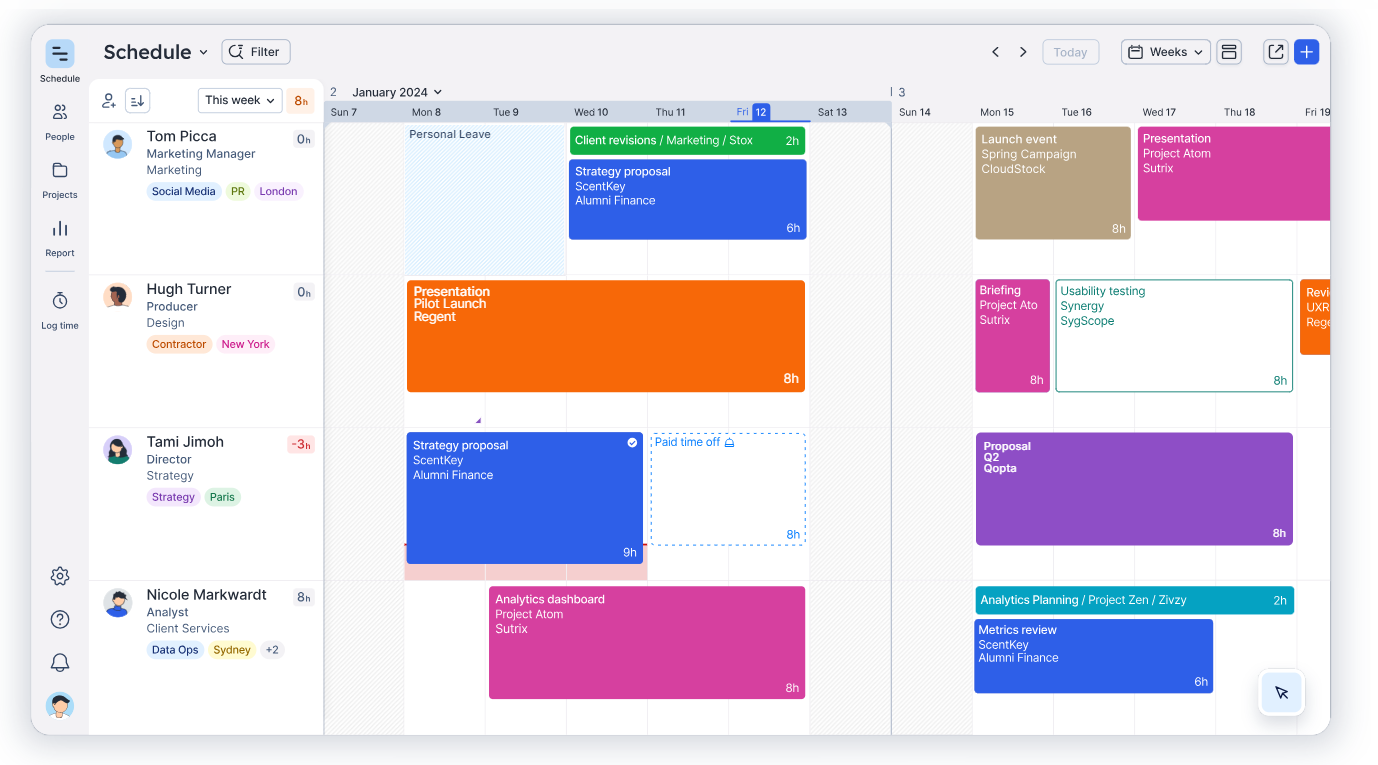
Les planificateurs de capacité peuvent aussi facilement détecter à l’avance les lacunes en matière de compétences ou de ressources, ce qui facilite l’embauche et la sous-traitance préalables.
Float offre un essai gratuit et ne propose que des services d’abonnement, bien qu’il se connecte à des applications de travail populaires telles que Slack et Asana.
5. Resource Guru – Une planification des ressources au sens large
Resource Guru propose une gamme de plans premium pour vous aider à gérer les autres réservations que seulement les ressources humaines. Il vous permet de connaître les membres de l’équipe sous-utilisés ou le personnel en demande.
Les fonctionnalités comprennent la visibilité du calendrier pour tous les membres de l’équipe et tous les services, des alertes en cas de conflits de planification pour éviter les compromis de dernière minute, et un système de gestion des congés intégré pour la planification des congés.

En résumé, Resource Guru vous donne une vue d’ensemble de la disponibilité de toutes vos équipes, ce qui vous permet d’identifier les cas de sous-capacité et d’exploiter au mieux vos ressources immédiatement.
Pour prendre des décisions éclairées et fixer des attentes raisonnables pour vos projets potentiels, vous pouvez filtrer votre personnel en fonction de sa localisation, de son département et de son niveau d’expertise. En outre, vous avez la possibilité de suivre en permanence les taux d’utilisation afin de déterminer si vos effectifs doivent être ajustés.
Resource Guru est un excellent outil pour gérer les emplois du temps des employés en raison de ses vues de calendrier et de sa simplicité, mais les entreprises ont tendance à le dépasser rapidement lorsqu’elles cherchent à ajouter d’autres fonctionnalités à leurs piles technologiques, notamment la gestion de budget de projet ou des capacités de planification de projet plus poussées.
Le coût mensuel de son plan de base est de 6 dollars par utilisateur.
6. 10,000ft by Smartsheet – Pour une allocation des ressources et une planification simples
Logiciel de coopération sur le lieu de travail. Un excellent logiciel de planification de la capacité a été produit à la suite de l’acquisition par Smartsheet, en 2019, de 10,000 ft, une startup de planification de la capacité en mode SaaS.
Il offre des estimations précises du pipeline, des feuilles de temps pré-remplies qui permettent aux employés de déclarer facilement leurs heures de travail, et une allocation directe des ressources qui permet aux chefs de projet de choisir la meilleure équipe ou la meilleure personne pour un travail donné.

Grâce à ce programme, les utilisateurs peuvent toujours enregistrer et contrôler leurs plans, leurs ressources et leurs calendriers, ce qui permet de développer de nouvelles méthodes de travail. Il permet d’estimer avec précision les besoins d’embauche et de maintenir l’efficacité de tous les processus.
Semblable à Toggl, il permet à vos ressources d’enregistrer leurs heures de travail afin que vous puissiez contrôler la façon dont elles utilisent leurs heures productives et facturer vos clients avec précision. Smartsheet simplifie les choses pour les utilisateurs en fournissant des feuilles de temps pré-remplies avec une interface facile à utiliser, de sorte que vous pouvez commencer sans formation préalable.
Pour générer des mises à jour de projets et une communication uniformes et directes, Smartsheet se connecte également à d’autres applications de gestion de la relation client (CRM) et de communication sur le lieu de travail.
7. Mavenlink – conçu pour la gestion des ressources
Mavenlink rend la planification de la capacité rapide et simple en connectant les gens et en fournissant de l’efficacité et des informations. Il se présente comme un logiciel innovant, à jour et conscient des besoins des gestionnaires de projets d’aujourd’hui.
Les utilisateurs peuvent immédiatement appréhender les besoins en personnel pour l’avenir prévisible et ajouter des ressources aux projets en fonction des besoins. La visibilité en temps réel sur les budgets, les dépenses, les ressources et les calendriers est assurée par des perspectives actualisées à la minute près. D’un simple clic, les utilisateurs peuvent agir et apporter des changements significatifs grâce à un haut degré de contrôle.

Cependant, Mavenlink et Kimble ont récemment fusionné pour former Kantata, ce qui signifie un impact et des capacités accrus. En utilisant à la fois des affectations fermes et souples, l’outil vous aide à prévoir la capacité et à veiller à ce que l’offre et la demande de vos ressources soient constamment en équilibre. Par conséquent, il vous aidera à réduire les délais de recrutement et à faciliter des temps de réponse rapides.
8. Saviom – Rapports détaillés sur la capacité et planification de la demande
Comme de nombreux autres logiciels de planification de la capacité, Saviom fournit des visualisations en temps réel et prospectives de la consommation des ressources afin d’améliorer la planification. Les utilisateurs sont en mesure de planifier à l’avance les périodes où les ressources ne seront pas accessibles, de réserver les ressources lorsqu’elles sont nécessaires et de surveiller la demande pour des ressources spécifiques.

Saviom comprend des caractéristiques qui s’adaptent aux conditions changeantes, ce qui lui confère un avantage sur les outils de planification de la capacité concurrents. Si nécessaire, les utilisateurs peuvent modifier les horaires, recycler le personnel et augmenter leurs effectifs ; Saviom les aide à déterminer quand ces mesures et d’autres mesures d’urgence sont nécessaires.
9. Birdview PSA – Logiciel de planification de la capacité tout-en-un pour les sociétés de services professionnels
Pour les équipes de prestation de services, Birdview PSA est une solution complète qui intègre de puissantes fonctions de gestion des ressources, des projets et des finances dans une plateforme unique et centralisée. Grâce à des outils sophistiqués de planification des capacités, vos responsables peuvent détecter et résoudre les problèmes de sous-charge des équipes et toujours trouver la personne idéale pour le travail à effectuer afin de maximiser l’utilisation de vos ressources en temps réel.

Vous pouvez prédire efficacement vos besoins futurs en ressources et respecter les délais en utilisant Birdview PSA pour créer des rapports BI pertinents qui prennent en compte les changements dans le calendrier de l’équipe et les délais du projet. Vous pouvez utiliser ces rapports pour éclairer toutes les décisions que vous prenez en matière de ressources et pour déterminer si vous disposez des ressources suffisantes pour mener à bien les tâches en cours ou en prendre d’autres.
10. Forecast – Gestion de projet et planification de la capacité en un seul outil
La planification des capacités est un nouvel ajout à la gamme complète de logiciels PSA de Forecast. Il peut constituer un choix judicieux si vous recherchez un outil pour gérer les projets et les activités associés à votre travail d’agence créative, ainsi que la planification des ressources et la gestion financière. Forecast facilite l’attribution du travail et l’interaction entre les différentes fonctions, ce qui en fait un outil idéal pour les sociétés de services professionnels de plus de cinquante personnes.

Selon un récent communiqué de presse, les nouvelles composantes essentielles de la planification des capacités sont les suivantes :
- Les places réservées permettent de délimiter les ressources sans s’attacher les services d’une personne en particulier
- Les recommandations de recrutement basées sur l’IA en fonction du poste, des talents et de la disponibilité
- Les allocations en douceur permettent de réserver les ressources souhaitées à l’avance
- La probabilité de gain est incluse dans la vue d’ensemble des capacités afin de montrer les chances de réussite d’un projet et l’impact sur les ressources.
Quel est le programme le plus efficace pour la planification de la capacité ?
Nous avons anticipé votre question. Comme vous pouvez le constater ci-dessus, les entreprises ont besoin de solutions différentes.
Le meilleur outil de planification des capacités n’en est pas vraiment un. Il dépend plutôt des besoins de votre entreprise et des objectifs de la planification des capacités.
Voici quelques éléments à prendre en compte lors de la sélection du programme de planification des capacités qui VOUS convient :
Comment choisir une plate-forme adaptée à la planification des capacités ?
Objectifs de la planification des capacités
Quelles fonctions votre plate-forme de planification des capacités doit-elle réellement remplir ? Ne vous laissez pas abuser par des fonctions dont vous n’avez peut-être pas besoin. Dressez une liste des éléments que votre outil doit, devrait, pourrait et ne doit pas inclure après avoir consulté les parties prenantes.
Taille et complexité de votre entreprise
Certaines entreprises ont besoin d’une solution abordable et facile à prendre en main avec juste assez de capacités pour planifier le travail d’une petite équipe. D’autres, qui disposent d’une main-d’œuvre importante et complexe, peuvent souhaiter investir dans une solution de gestion de la capacité de niveau entreprise.
La capacité d’évolution
N’oubliez pas de prendre en compte vos objectifs de croissance. Assurez-vous que votre plateforme de planification des capacités peut s’étendre pour accueillir davantage d’utilisateurs, de projets et de ressources si votre organisation est prête à se développer.
Diverses exigences des utilisateurs
Nous nous sommes concentrés sur les besoins des gestionnaires de projets. Cependant, ils ne seront pas les seuls à utiliser votre système. Pensez aux fonctionnalités spécifiques à chaque utilisateur, notamment la possibilité de consulter leur emploi du temps personnel et l’affectation des ressources, ainsi qu’aux fonctionnalités nécessaires aux cadres supérieurs, telles que l’accès aux données pour la prise de décision.
Utilisation
Un outil de planification des capacités qui facilite la planification est nécessaire. La facilité d’utilisation doit donc être une priorité absolue. Il est essentiel de disposer d’une fonctionnalité intuitive, d’une interface utilisateur visuellement attrayante et d’une visualisation claire des données.
Coûts
Pouvez-vous vous contenter d’un outil gratuit ou devez-vous payer pour une plateforme afin d’obtenir les fonctionnalités dont vous avez besoin ? Quelle est la valeur d’une meilleure planification des capacités pour vous ? Pensez au temps gagné, aux capacités démontrées et aux possibilités offertes lorsque vous évaluez le rapport coût-bénéfice de l’achat d’un produit approprié.
Intégrations et compatibilité
Votre plateforme de planification des capacités doit-elle s’interfacer avec d’autres systèmes vitaux de l’entreprise ? Disposez-vous de développeurs capables de créer vos propres intégrations ou avez-vous besoin de solutions prêtes à l’emploi ?
Hébergement et assistance
Préférez-vous l’informatique dématérialisée ou avez-vous besoin que votre logiciel reste sur site ? Préférez-vous que le fournisseur vous aide ou disposez-vous d’administrateurs système au sein de votre personnel ?
Outils de planification des capacités : ce qu’il faut retenir
Dans l’ensemble, les logiciels de planification de la capacité sont devenus des outils essentiels pour les équipes et les responsables de projets. Ils restent accessibles en termes de coût et permettent de simplifier considérablement la planification, tout en améliorant l’efficacité et l’utilisation des ressources. Les solutions plus avancées offrent une meilleure visibilité, des analyses plus fines et aident à éviter les surcharges ou les sous-allocations.
Avec le temps, de nombreuses équipes évoluent des tableurs ou outils basiques vers des logiciels de planification plus structurés. Les équipes qui doivent planifier la capacité sur plusieurs projets, équilibrer les charges jour après jour et anticiper la disponibilité des ressources sur le moyen terme se tournent généralement vers des outils de planification dédiés, comme Teambook, afin de mieux piloter leur capacité réelle et prendre des décisions plus fiables.
Pour approfondir cette transition, découvrez la comparaison entre Teambook et Excel et comment passer d’un tableur à un logiciel de planification dédié.