HubSpot’s integration into Teambook paves the way for smoother, more automated project management. This integration makes it possible to transfer HubSpot deals to automatically convert them into Teambook projects, making it easier to synchronise your sales activities with your projects.
How can HubSpot be integrated into Teambook?
Integrating Hubspot with Teambook is very simple. Just follow the steps below:
Generating the API key
Start by generating an API key in HubSpot. Keep a copy of this key in your clipboard.
Configuration in Teambook
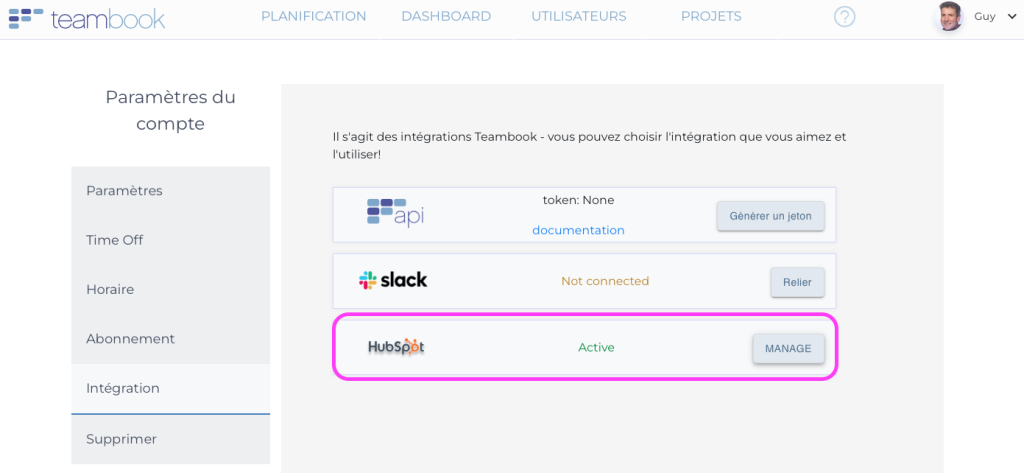
- Go to Teambook and access the Integration tab in the account settings.
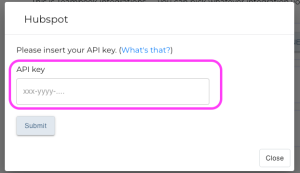
- Click on the “Manage” button and copy the API key previously collected in HubSpot.
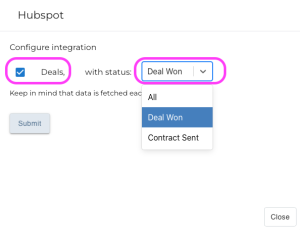
- In the pop-up window that appears, tick the “Deal” box and select the status from which you want to automatically create a project in Teambook.
Data synchronisation
- Data between HubSpot and Teambook is synchronised every 10 minutes.
- Projects generated from HubSpot will have the suffix “HS” at the beginning of their name.
Benefits of HubSpot integration in Teambook
Project automation
- The automatic conversion of HubSpot Deals into Teambook projects eliminates the need for manual input, reducing errors and saving valuable time. This automation ensures a smooth transition between the sales and project implementation phases.
Real-time synchronisation
- Synchronising data every 10 minutes means that teams are always up to date with the latest information and project changes. This ensures that all stakeholders have access to the latest data, improving decision-making and responsiveness.
Optimised organisation
- Adding the suffix “HS” to projects generated from HubSpot makes it easier to identify and track them. This feature contributes to better organisation and management of projects, enabling teams to focus on priorities and improve efficiency.
Data consistency
- Integration ensures data consistency between sales and project management. Information is uniform and up-to-date, reducing the risk of misunderstandings and conflicts, and promoting smooth collaboration between teams.
Time saving and efficiency
- By automating the creation of projects and regularly synchronising data, teams save time and can focus on higher added-value tasks. This translates into increased productivity and operational efficiency.
Better allocation of resources
- With a clear, up-to-date view of current and future projects, managers can better allocate resources and optimise the workload of each team member. This enables more judicious use of skills and improves job satisfaction.
Conclusion
HubSpot’s integration with Teambook is a major asset for teams looking to optimise their workflow and ensure a smooth transition between sales activities and project management. The integration makes data synchronisation and project automation child’s play, allowing teams to focus on what really matters.