




Capacity planning tool for growing teams
See available capacity across your resources, forecast upcoming project demand, and make confident decisions about staffing, hiring, and new work.
Know if you have the capacity before you commit
When project schedules, allocations, availability, and pipeline work live in different places, it’s difficult to know how much capacity you actually have.
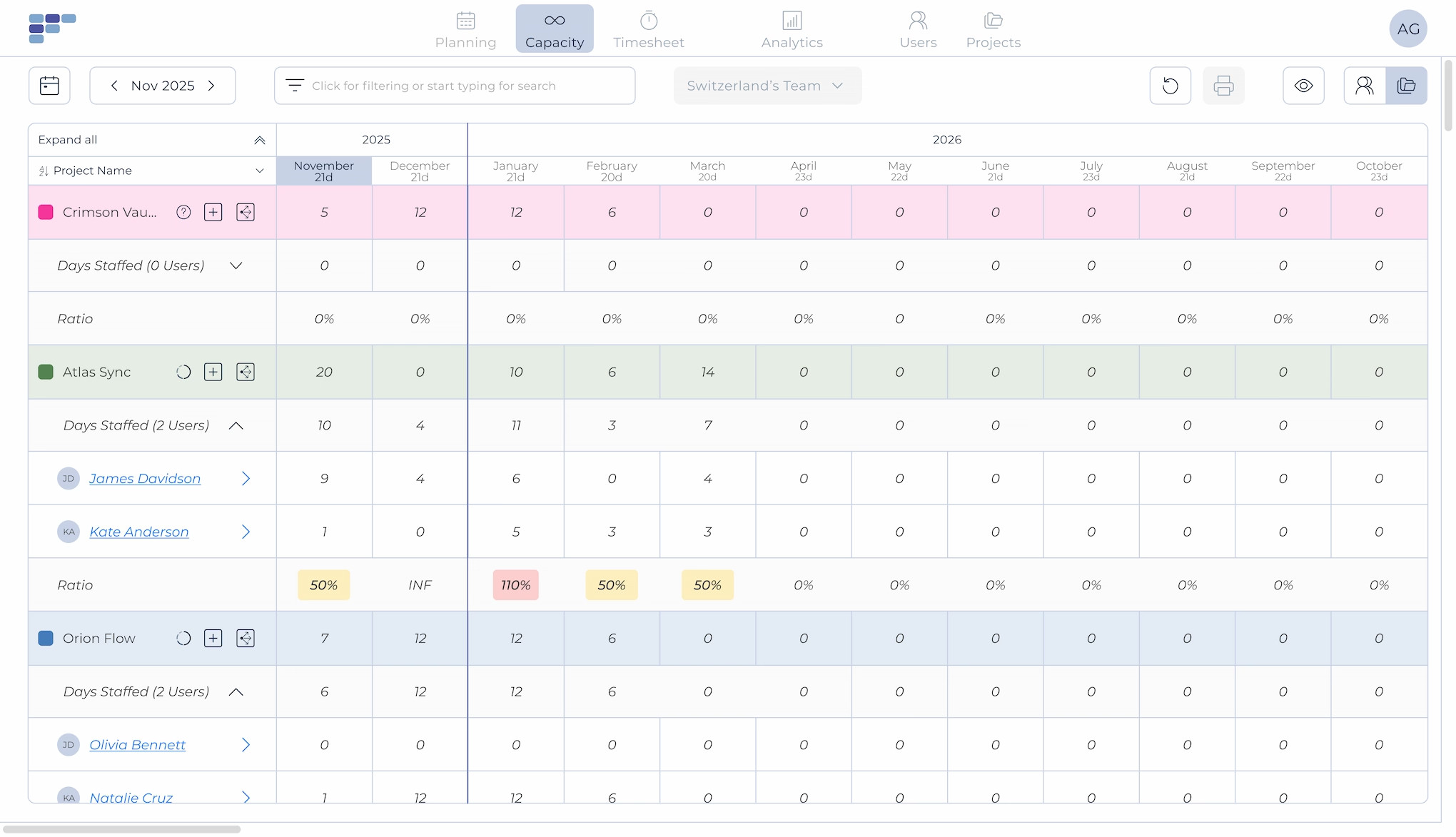
Teambook brings resource availability and project demand together, so you can see where you have room for more work, where capacity is getting tight, and where you may need more people.
Resource Capacity
See who's available and when
See available and allocated capacity across your people, projects, and teams. Know who's fully booked, who's becoming available, and where you have room to assign more work.Keep one shared view of capacity instead of piecing it together from spreadsheets, calendars, and individual project plans.
Demand vs. Capacity
Know if you have the resources for upcoming work
Compare available capacity with confirmed and upcoming project demand. See whether you have enough people to staff new projects, where demand is likely to exceed capacity, and when additional resources may be needed.
Capacity Forecasting
Spot future resource gaps early
Look months ahead to see where you may be short on capacity or carrying too much unallocated time. Use your capacity forecast to decide whether to reallocate work, adjust project timing, bring in contractors, or start hiring before a staffing gap becomes a delivery problem.
Scenario Planning
See how upcoming projects affect capacity
See what happens to your resource capacity when new work enters the pipeline or project timelines change. Compare different scenarios before committing to new work, changing delivery dates, or adding headcount.
Why teams choose Teambook
Built for project-based businesses
Plan capacity around real project demand. Teambook helps consultancies, agencies, IT services, engineering firms, and other professional services businesses match available resources with upcoming work.
Simple enough to keep your plan current
Capacity forecasts are only useful when the underlying plan stays accurate. Teambook makes allocations visual and easy to update as projects, availability, and priorities change.
Plan today and months ahead
Handle today's staffing needs while looking ahead at future capacity. See upcoming availability, project demand, and resource gaps early enough to act.



See how much is poor project resource planning costing you
Try our project resource calculator and find out how to optimize your resource management. Share your email and discover how Teambook can improve your topline.

Works with the tools your team already uses
Capacity planning doesn't happen in isolation. Teambook connects with calendars, HR systems, and other business tools, helping keep availability and planning information connected without duplicate work or manual data entry.

“We can finally overview capacity of all employees in a pretty colorful and easy way. Automated system of tracking over-schedule and under-schedule. A pretty nice time tracking solution in one tool is also a plus”
- George P
- Engineering
Ready to plan capacity with confidence?



Frequently asked Questions
What is a capacity planning tool?
A capacity planning tool helps businesses compare available resources with current and future demand. For project-based businesses, this means understanding how much capacity is available, how much is already committed, and whether there are enough resources to deliver upcoming projects.
What is the difference between capacity planning and resource planning?
Capacity planning looks at whether you have enough resources to meet expected demand. Resource planning focuses on assigning those resources to specific projects.
For example, capacity planning might show that you will be short on capacity next month. Resource planning helps determine who can be reassigned, which allocations can change, and how that gap can be addressed.
How do you forecast resource capacity?
Resource capacity forecasting compares future availability with expected project demand. Existing allocations, working schedules, time off, confirmed projects, and upcoming work all affect how much capacity will actually be available.
A capacity planning tool makes these changes easier to track without rebuilding forecasts manually.
How do you know if you have enough capacity for a new project?
Compare the resources required for the new project with the capacity available during its planned delivery period.
Consider existing allocations, upcoming projects, availability, and the roles or skills required. If demand exceeds capacity, you may need to change timelines, reallocate resources, use contractors, or hire.
Can you use Excel for capacity planning?
Yes. Excel and Google Sheets can work for basic capacity planning, especially for smaller teams with relatively stable workloads.
Spreadsheets become harder to maintain when project dates, allocations, availability, and demand change frequently. Capacity planning software provides a shared view of current and future capacity without relying on manually updated spreadsheets and formulas.
How does capacity planning help with hiring?
Capacity planning shows when expected project demand is likely to exceed your existing resource capacity.
This helps managers identify staffing gaps before people become overloaded and decide whether to reallocate work, use contractors, hire additional employees, or adjust project timelines.
Who uses capacity planning software?
Capacity planning software is commonly used by resource managers, staffing managers, operations teams, project managers, PMOs, and business leaders responsible for matching people with project demand.
It is particularly useful for consultancies, agencies, IT services, engineering firms, and other professional services businesses where available resources determine how much client work can be delivered.