




Resource allocation software for project teams
Assign the right people to the right projects, see availability before you allocate work, and keep workloads balanced as plans change.
Put the right people on the right work
Allocating resources gets difficult when availability, existing commitments, project requirements, and changing schedules live in different places.
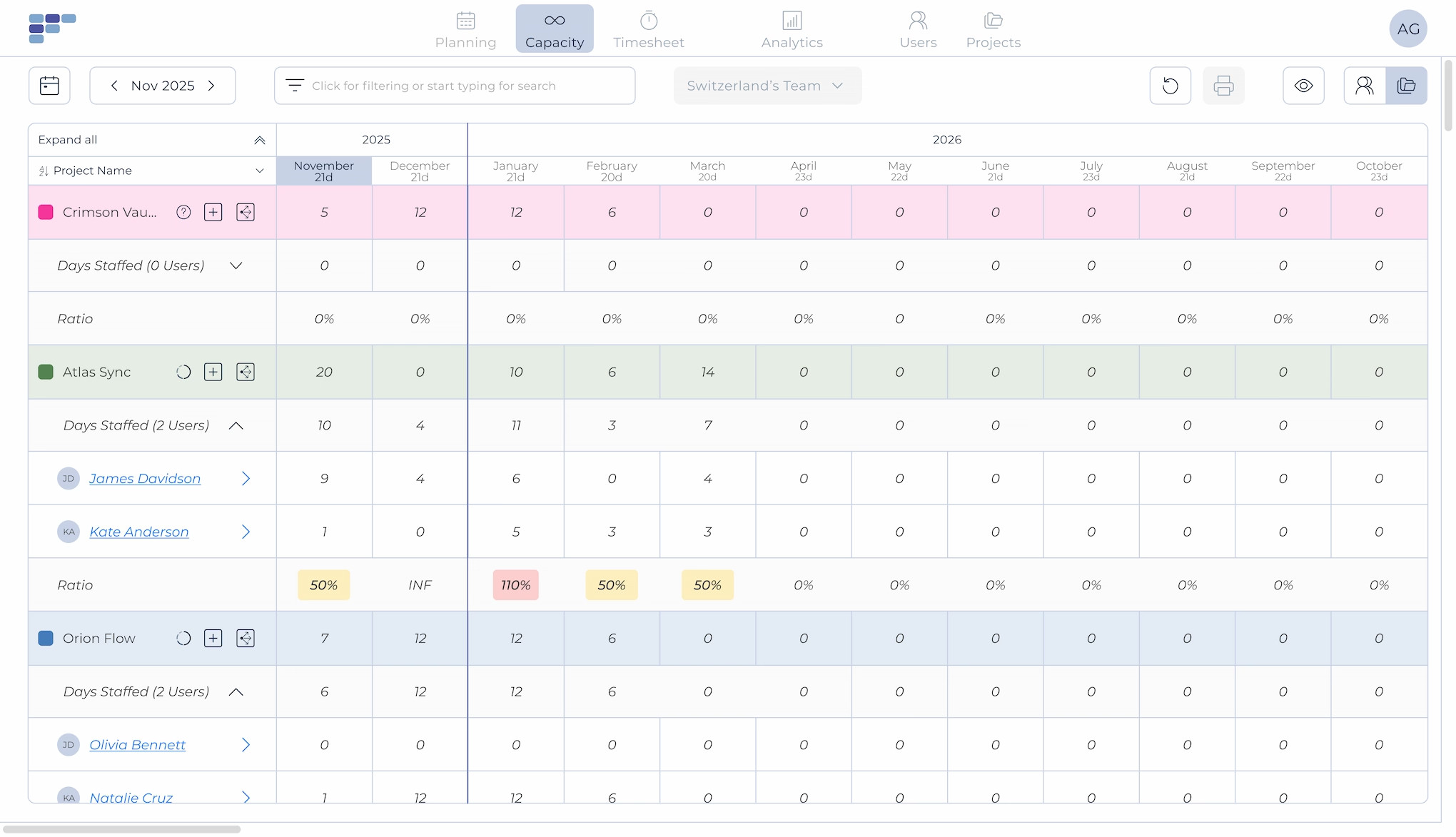
Teambook brings resource availability and project allocations into one visual plan, so you can quickly decide who to assign, avoid scheduling conflicts, and adjust allocations as priorities change.
Resource Availability
See who can take on new work
See who's available, already allocated, or becoming available across your people and projects. Check existing commitments before assigning new work and find suitable resources without jumping between spreadsheets, calendars, and individual project plans.
Project Allocation
Assign people to projects with confidence
Allocate people directly to projects and see their assignments alongside the rest of the team's workload. Plan work by days or hours and adjust allocations as project requirements, timelines, or availability change.
Workload Visibility
Catch overallocations before they become a problem
See when someone's workload exceeds their available time or when people have room for additional work. Rebalance assignments early to avoid overloaded team members, delivery conflicts, and unnecessary idle capacity.
Allocation Planning
Plan allocations across upcoming projects
Look beyond today's assignments and plan resources for upcoming work. See how future projects affect people's availability, reserve resources ahead of time, and make better staffing decisions before projects begin. This keeps all four blocks about allocation decisions, rather than turning the lower two into capacity forecasting again.
Why teams choose Teambook
Built for project-based businesses
Allocate resources around real project work. Teambook helps consultancies, agencies, IT services, engineering firms, and other professional services businesses coordinate people across multiple clients and projects.
Simple enough to keep allocations current
Resource plans quickly become useless when nobody updates them. Teambook makes allocations visual and easy to change, so project and resource managers can keep the plan aligned as schedules and priorities shift.
See allocations and availability in one place
Understand who's working on what, when they're available, and where workloads need attention. Move from individual assignments to a wider team view without maintaining separate planning spreadsheets.



See how much is poor project resource planning costing you
Try our project resource calculator and find out how to optimize your resource management. Share your email and discover how Teambook can improve your topline.

Keep resource availability connected
Resource allocation works better when availability isn't maintained manually across different tools. Teambook connects with calendars and other business tools to help keep schedules, time off, and resource plans aligned.

“We can finally overview capacity of all employees in a pretty colorful and easy way. Automated system of tracking over-schedule and under-schedule. A pretty nice time tracking solution in one tool is also a plus”
- George P
- Engineering
Allocate resources with confidence. Try Teambook for free.



Frequently asked Questions
What is resource allocation software?
Resource allocation software helps businesses assign people to projects based on factors such as availability, workload, project requirements, and timing. It gives resource and project managers a shared view of who is working on what and where additional resources are available.
What is resource allocation in project management?
Resource allocation in project management is the process of assigning available people, time, and other resources to project work. For project-based businesses, this usually means deciding which team members should work on which projects, for how long, and at what level of allocation.
What is the difference between resource allocation and resource planning?
Resource planning is the broader process of understanding resource needs, availability, and future demand. Resource allocation is the specific step of assigning available resources to projects and work. Allocation is therefore one part of resource planning.
How do you allocate resources across multiple projects?
Start by comparing project requirements with each person’s availability and existing commitments. Then assign resources based on project timing, workload, and relevant skills. A shared resource allocation tool makes it easier to identify conflicts and rebalance assignments when priorities change.
How do you prevent resource overallocation?
Keep project allocations and availability in one shared plan and check total workloads before making new assignments. Resource allocation software can make conflicting assignments and overloaded schedules easier to identify before they affect delivery.
Can you use Excel for resource allocation?
Yes, small teams can allocate resources using spreadsheets. However, spreadsheets become harder to maintain as the number of people and concurrent projects grows. Dedicated resource allocation software provides a shared, visual plan that is easier to update when assignments and schedules change.
Who uses resource allocation software?
Resource managers, project managers, PMOs, operations teams, delivery managers, and business leaders use resource allocation software. It is particularly useful for consultancies, agencies, IT services, engineering firms, and other project-based businesses managing people across multiple projects.