





Your entire team's schedule at a glance
Plan and schedule your team across projects with a clear, visual planning board.
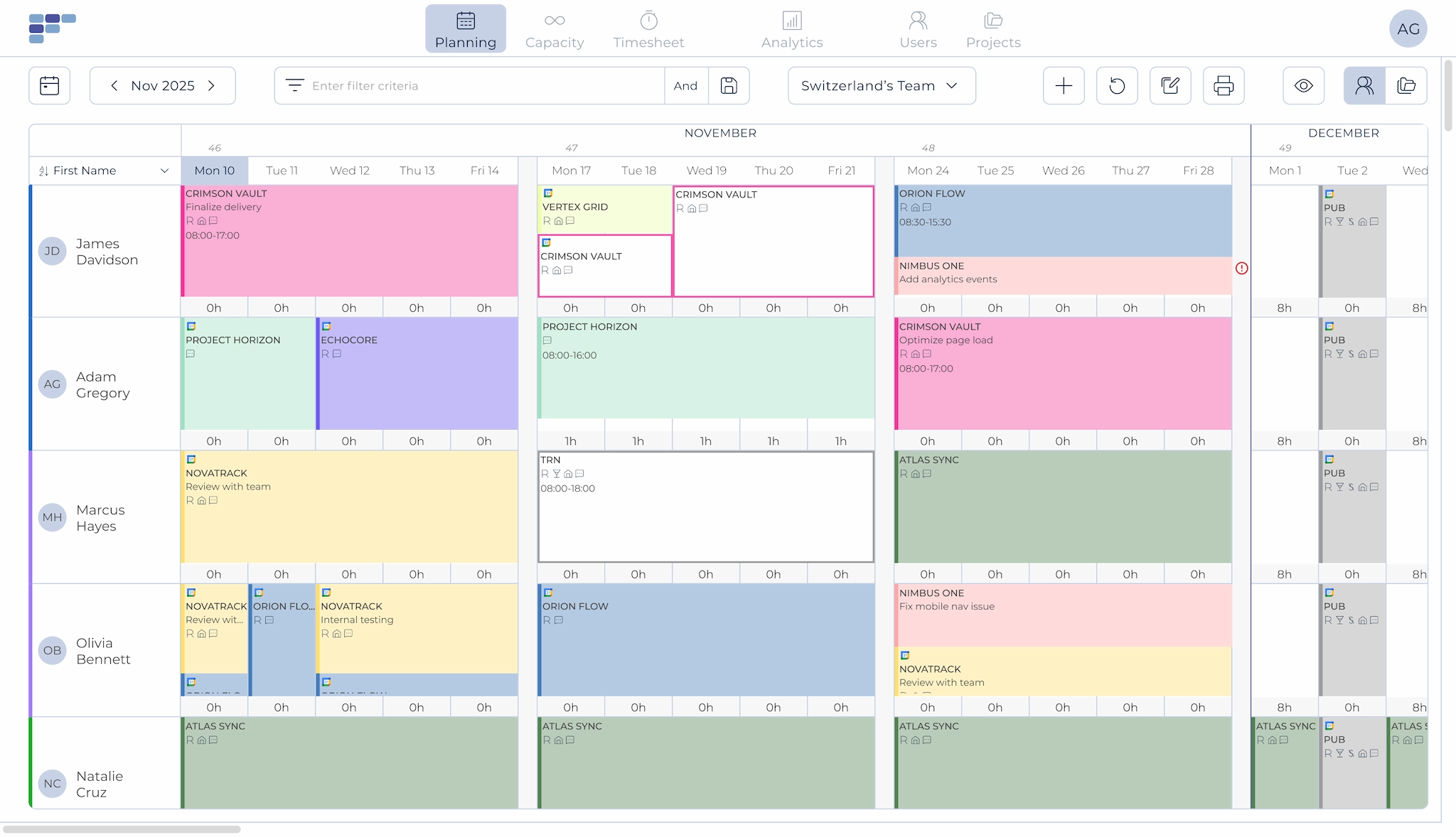
One screen, complete clarity
Teambook's planning board gives you a clear overview of your entire organisation's activities. See who's working on which project and when, who's available, and who's on holiday. All at a glance.
Quick Allocations
Assign work in seconds, not Hours
Allocate one or more team members with a simple click or drag and drop. Set up recurring assignments to save time on repetitive scheduling. When plans change - and they always do - group updates and drag-and-drop make adjustments fast.
Monitor project budgets in real time as you allocate. Simple, intuitive planning that actually works.
View by User & by Project
Switch perspectives with one click
View your schedule by team member to see individual workloads, or switch to project view to see everyone assigned to a specific project. Toggle between perspectives instantly to get exactly the view you need.
Mark assignments as tentative when timing isn't confirmed. Add project milestones to focus resource allocation at the right moments."
Tasks & Comments
Add context to every assignment
Qualify each booking by selecting from pre-defined tasks or adding comments. Your team sees not just when they're working, but what they're working on, without digging through emails or project tools.
Real-Time Updates
Everyone stays in sync
Changes show up instantly for everyone. Team members can view their schedules on screen, in their synced calendar, or via email notifications. No more outdated spreadsheets or 'I didn't know about that' surprises.
What changes when planning is clear
Faster staffing decisions
See availability instantly. Assign the right people in minutes, not hours.
Fewer scheduling conflicts
Visual workload indicators show overallocation before it becomes a problem.
Less time in meetings
When everyone can see the plan, you spend less time explaining it



See how much is poor project resource planning costing you.
Try our project resource calculator and find out how to optimize your resource management. Share your email and we’ll send you a link.

Works with your calendar
Try our project resource calculator and find out how to optimize your resource management. Share your email and we’ll send you a link.

“Pragmatic planning tool! Very intuitive to use, sync with calendar so staff always have the latest schedule, can easily interface with other tools, good management report (forecast, bookings levels, etc.)”
- Pierre L
- IT Consulting
See how easy planning can be



Frequently asked Questions
What are the main functionalities of a resource management software for operational management?
A resource management software offers a number of essential functions, such as task planning, resource allocation and performance monitoring. It also allows you to view schedules, manage priorities and generate reports to optimise team efficiency.
How can a resource planning tool help optimise task planning for operational management?
The resource planning tool facilitates planning by enabling you to create detailed schedules, allocate the resources needed for each task, monitor progress and manage deadlines. It also offers real-time communication and notification functionalities to ensure effective coordination and avoid delays.
How does a resource management tool make it easier to monitor the performance of operational teams?
A resource management tool provides performance monitoring tools for operational management. It collects and analyses key data such as lead times and productivity. This information enables managers to assess team performance, identify areas for improvement and take corrective action to optimise results.
Does the resource management software make it easier for operational management to coordinate operations?
Yes, a resource management tool makes it easier to coordinate operations. It enables information to be centralised, schedules to be shared in real time and the progress of tasks to be monitored. This fosters collaboration between team members, improves visibility of operations and enables faster, more effective decision-making.
Are resource management tools suitable for all types of team?
Yes, resource management tools can be used by different types of team, whether they are managerial, operational or from any other field. Functionalities can be tailored to the specific needs of each team. This type of tool is also suitable for several types of industry, such as agencies, engineering and construction firms. Teambook is multi-project.
How do I choose the best resource management tool for my team?
It is important to consider the functionality offered, the user-friendliness of the interface, scalability, integrations with other tools and user feedback. A demonstration of the solution and an assessment of its relevance to the specific needs of your team can also be useful in the selection process.