



Most staffing leads start looking for the best resource management software after the same kind of week: two consultants booked on the same days, a new client project nobody can staff, and a spreadsheet that only one person dares to edit. The right resource management software puts availability, project bookings, and capacity in one plan, so you can see who’s free before you say yes to new work.
We compared 10 tools on what changes the decision for agencies, consultancies, IT services firms, and engineering offices of 10 to 100 people: how they charge (per person or per project), how far ahead they let you plan capacity, whether there’s a free trial, and where your planning data is hosted.
At a glance: quick picks
- Agencies, consultancies, and engineering offices with many projects: Teambook, a Swiss company with data hosted in Germany, priced per project with unlimited users.
- Scheduling-led teams: Float or Resource Guru, both priced per person.
- Firms that want resourcing, billing, and expense tracking in one platform: Kantata, priced on request.
- Teams that already use Harvest: Harvest Forecast, at $5 per person per month on annual billing.
- Strict EU data requirements: Teambook (Germany), Napta (AWS Frankfurt), Runn or Teamdeck (Ireland), or Productive (EU).
- Teams under 20 people: check seat minimums first. Runn asks for at least 20 seats, while Teambook charges by project.
What Resource Management Software Does for a Staffing Team
Resource management software tells you who can work on which project, when, and for how long. It replaces the shared spreadsheet with one plan where availability, time off, and project bookings sit side by side, and it warns you when someone’s booked beyond the hours they have.
- Resource management software
- A planning tool that brings people, availability, project bookings, and capacity into one view. You book people onto projects, see who is overloaded or idle, and check whether the work you expect next quarter fits the hours your team actually has. Some tools add timesheets, so you can compare planned time with the time people actually spend.
Resource Planning, Resource Management, and Resource Allocation: What’s the Difference?
Resource management is the whole practice of matching people and their time to work. Resource planning looks ahead (which projects are coming and who could take them), resource allocation is the act of booking a named person onto a project, and capacity planning checks whether the total demand fits the hours available.
How We Evaluated These Resource Management Tools
We judged every resource management tool on the decisions a staffing lead makes each week, not on the length of its feature list. All prices, trials, and hosting details come from each vendor’s own website (pricing, privacy, security, and help pages). We didn’t use review sites, and we don’t quote ratings.
- Team profile. Which sectors and team sizes the tool suits.
- Planning and capacity scope. How far ahead you can plan, and whether you can compare future demand with available hours.
- Pricing model. Per person, per seat, per project, or on request.
- Public price. The starting price the vendor publishes, in its own currency, without conversion.
- Trial or free access. A free plan, a time-limited trial, or a demo workspace aren’t the same thing.
- Data hosting and languages. Where the vendor says planning data is stored, and which interface languages it publishes.
- Integrations. Links with project, calendar, HR, or time-tracking systems your team already uses.
- Setup effort. How much work you’ll put in to enter people, projects, and absences before the plan is useful.
- Limits. The team profiles or workflows where another option fits better.
Good to know
When a vendor doesn’t publish a detail on its official pages, the table says “not published”. That doesn’t mean the feature or option is missing, only that you should ask the vendor before you compare costs or data handling.
Best Resource Management Software: Comparison at a Glance
Start with three columns: pricing model, public price, and data hosting. Together, they’ll narrow the list quickly for most European teams. Teambook suits multi-project teams that want to pay per project rather than per person, while Float, Resource Guru, and Runn are built around a per-person schedule.
| Tool | Best for | Pricing model | Public starting price | Data hosting (as published) | Free trial or plan |
|---|---|---|---|---|---|
| Teambook | Agencies, consultancies, IT services, engineering offices | Per project, unlimited users | €2 per project per month | Germany | 30 days, no card |
| Float | Project cost estimates, English-speaking teams | Per scheduled person | from $7 per person per month | United States (Google Cloud) | 30 days, no card |
| Resource Guru | People and other resources (priced at 50%) | Per person, other resources at 50% | $5 per person per month, annual | Google Cloud, region not published | 30 days, no card |
| Kantata | Firms that want resourcing, billing, and expenses together | On request | On request | United States (AWS, Oregon and Virginia) | Not published |
| Runn | Advanced forecasting and scenarios, 20+ people | Per seat, 20-seat minimum | from $7 per seat per month | Ireland (EU) by default, US optional | 30 days, no card (Standard plan) |
| Harvest Forecast | Teams already on Harvest | Per person | $5 per person per month, annual | Google Cloud, region not published | 30 days, no card |
| Productive | Agencies wanting budgets and invoicing in one tool | Per user, 3-seat minimum | $10 per user per month, annual | AWS, EU (country not published) | 14 days, no card |
| Teamdeck | Mixed teams with light users | Per seat (Light or Full) | $1.80 Light seat, $5.40 Full seat, annual | AWS, Ireland | 14 days, no card |
| monday work management | Teams that want a general work platform | Per seat, 3-seat minimum | €9 per seat per month, annual | US, EU or APAC regions | Free plan for 2 seats; 14 days on Pro |
| Napta | Formal staffing workflows with data in Germany | Not published | Not published | AWS Frankfurt (Germany) | Not published |
Sources: each vendor’s pricing page and privacy or security page (teambookapp.com, float.com, resourceguruapp.com, kantata.com, runn.io, getharvest.com, productive.io, teamdeck.io, monday.com, napta.io). Prices aren’t converted between currencies.
Pricing Compared: Per User vs Per Project
The pricing model matters more than the headline price. Per-person tools grow with your headcount, while Teambook grows with the number of projects, so the same team can get very different bills. You’ll see it fastest by pricing one real team.
What 25 People and 30 Projects Cost With Each Pricing Model
Picture your own consultancy with 25 consultants and project managers, 30 active client projects, and everyone invited to see the plan. Teambook Planning costs €60 per month (30 × €2), whatever the number of users. Capacity and Timesheet add €1 per project per month each: €90 with one of them, €120 with both. Here’s the same team in the per-person tools, using the published prices of the plans we profile.
| Tool | What you pay for | Calculation | Monthly total (min–max) |
|---|---|---|---|
| Teambook | Projects | 30 × €2 (Planning) to 30 × €4 (all three modules) | €60–€120 |
| Float | Scheduled people | 25 × $7 (Starter) to 25 × $12 (Pro) | $175–$300 |
| Runn | Seats (20 minimum) | 25 × $7 (Lite) to 25 × $11 (Standard) | $175–$275 |
| Resource Guru | People | 25 × $5 (Grasshopper) to 25 × $12 (Master) | $125–$300 |
| Harvest Forecast | Planners and scheduled people | 25 × $5 (single plan, annual) | $125 |
Compare like with like: Float Starter includes capacity planning, so it lines up with Teambook Planning + Capacity (€90). Runn Standard and Float Pro add timesheets, so they line up with all three Teambook modules (€120). Source: pricing pages of Teambook, Float, Runn, Resource Guru and Harvest Forecast. This is an illustration with simple multiplication, not a market benchmark. The other tools are counted at the annual rate shown by default; Teambook’s annual discount, which isn’t published as a figure, isn’t applied. Minimum commitments aren’t included.
It’s the project count that moves Teambook’s bill: with 60 projects, Planning costs €120 a month. A team where each person carries many active projects will see the Teambook bill grow faster than its headcount, so count both your people and your projects before you compare, and check the current Teambook pricing page for annual billing.
Want to try your own numbers? The estimator below uses Teambook’s published prices.
The 10 Best Resource Management Software Tools in Detail
Among the ten tools we compared, Teambook charges per project. Float, Resource Guru, Runn, Harvest Forecast, Productive, Teamdeck, and monday charge per person or per seat, and Kantata and Napta don’t publish a price.
Teambook: Best for European Agencies With Many Projects
Teambook is resource management software for agencies, consultancies, IT services firms, and engineering offices that staff people across many projects at once. It’s made in Switzerland, customer data is hosted in Germany, and the app is available in five languages (English, French, German, Spanish, and Italian).
1. Teambook
Best for European teams of 10 to 100 people planning many projects at onceWhat it does well
- Drag-and-drop planning by person or grouped by project, with absences and vacation in the same plan
- Tentative bookings and a “To be confirmed” project status for work that isn’t signed yet
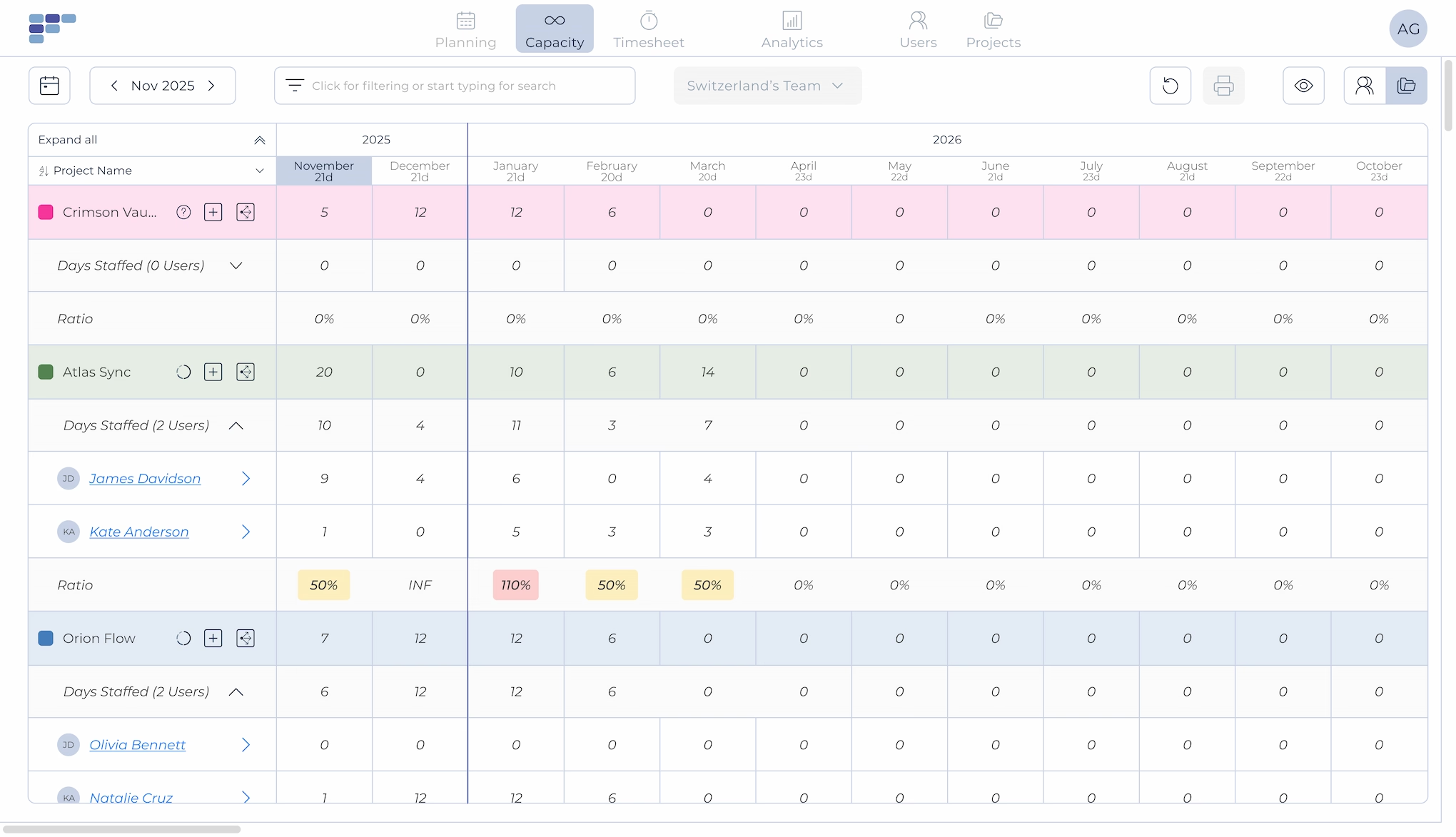
- Capacity module in person-days per month, by person and by project, comparing each person’s available days with the workload entered for each project, up to two years ahead
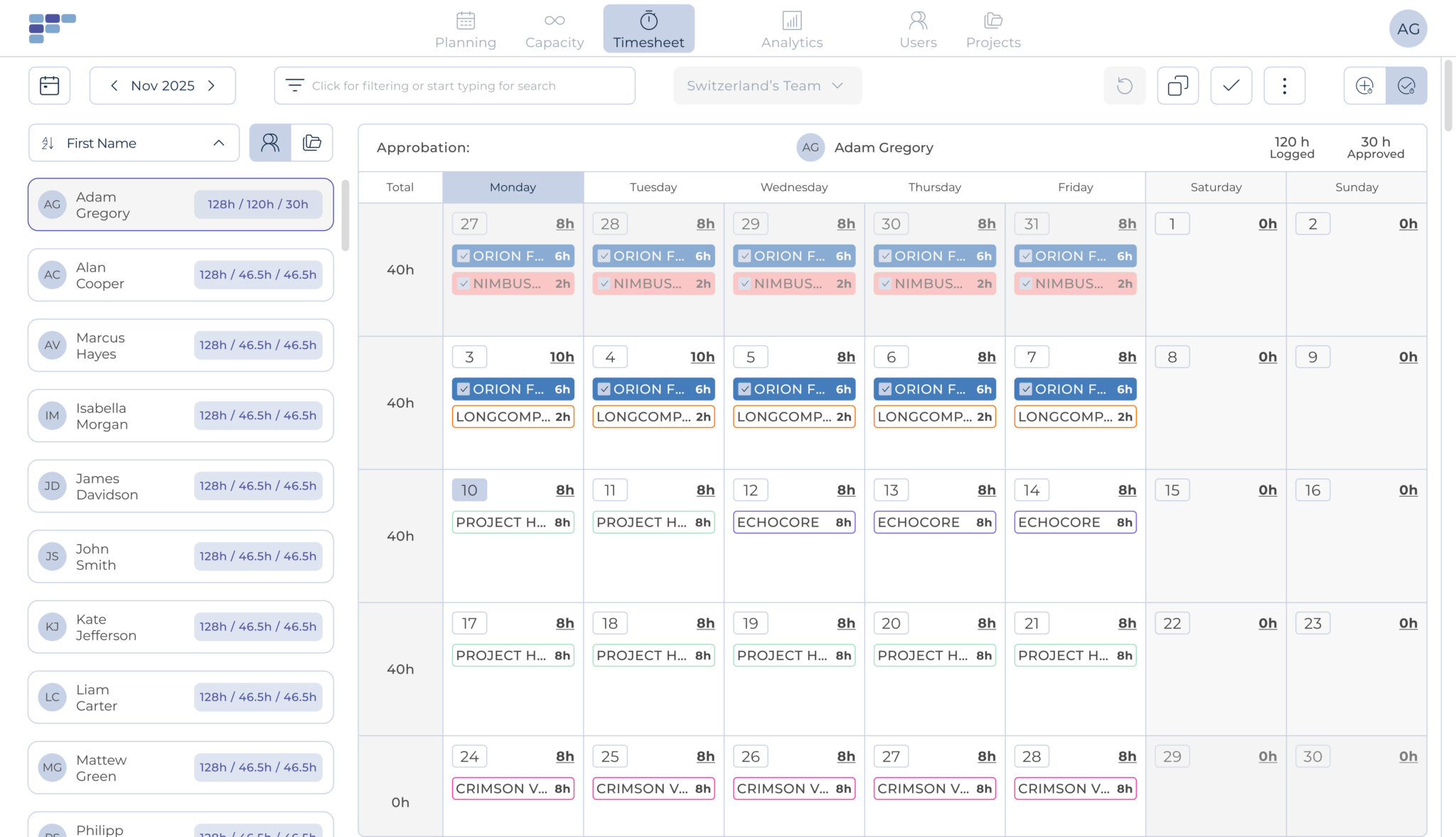
- Timesheets prefilled from the plan, approved by project managers and administrators
- Unlimited users, with guest access included on every plan, so the whole team can see the plan
- Integrations with HubSpot, Personio, Slack, Zapier, and Google or Outlook calendars
Where it falls short
- After the 30-day trial, the account stays readable but locked for changes until you choose a paid plan.
- It plans people across your projects rather than managing the projects themselves, so you’d keep your project management tool.
Choose Teambook if you plan many projects at once and want to add as many people as you need without paying per seat. The capacity planning module shows, month by month, whether the work you’ve sold fits the days your people have, and adding a prospective project to the forecast shows whether the team can absorb it. Klee Group’s IT department describes, in one of Teambook’s published case studies, how it gained control of capacity planning with Teambook.
Skip it if you want one platform that also covers project management or billing, or if each person carries many active projects at once, since the bill then follows the project count.
The Planning view is where you’ll make most staffing decisions, with one row per person and one block per booking, across several weeks.

For longer horizons, the Capacity view shows each project month by month, the days already staffed, and the ratio between the two.
Once the work’s done, the Timesheet view lets a manager review and approve logged hours person by person.
The quickest way to check is to enter your own projects and people in a free trial.
Float: Best for English-Speaking Teams That Estimate Project Costs
Float is resource scheduling software from a New York company.
2. Float
Best for English-speaking teams that want project cost estimates in the same toolWhat it does well
- Capacity, time off, and scheduling from the Starter plan
- Time tracking, advanced reports, and project cost estimates on the Pro plan
Where it falls short
- Data is hosted on Google Cloud in the United States, and there’s no published EU region.
- The interface is available in English only, according to its help center.
- Every scheduled person counts toward the bill.
Choose Float if your team works in English, your planning is schedule-led, and you want project cost estimates in the same tool. The 30-day trial on the Pro plan doesn’t need a credit card. Skip it if your clients ask for data hosted in Europe or your planners prefer to work in German or French.
Resource Guru: Best for Booking People and Other Resources Together
Resource Guru is a London-based resource scheduling tool.
3. Resource Guru
Best for teams that book people and other resources in one toolWhat it does well
- Tentative bookings on every plan
- Budgets, time tracking, and reports from the Blackbelt plan, plus a Capacity & Utilization report on Blackbelt and Master
Where it falls short
- It’s hosted on Google Cloud, and the region isn’t published.
- It’s priced per person, so the cost grows with headcount rather than project volume.
Choose Resource Guru if you also book other resources next to people, or if you want a low entry price per person. The 30-day free trial doesn’t ask for a card. Skip it if your bill should follow the number of projects rather than people, or if you need a published EU hosting region.
Kantata: Best for Resourcing, Billing, and Expenses Together
Kantata (formerly Mavenlink and Kimble) is a professional services platform.
4. Kantata
Best for firms that want resourcing, billing, and expenses in one platformWhat it does well
- Capacity planning and resource forecasting, with availability and demand in real time
- Salesforce partner
- Skills and availability tracking, with requests filtered by skill
Where it falls short
- No free trial is published.
- Main data center in Oregon, with disaster recovery in Virginia (United States); no EU option published.
Choose Kantata if you’re replacing several systems at once and want resourcing, billing, and expenses managed together. Skip it if you only need a clear staffing plan for a team of a few dozen people, or if your data must stay in Europe.
Runn: Best for Advanced Forecasting and Scenarios, With HR Integrations
Runn is capacity planning software from New Zealand, hosted in Ireland by default with a US option.
5. Runn
Best for teams of 20 or more that need advanced forecasting and scenariosWhat it does well
- Capacity and utilization views, with tentative projects you can plan before they’re signed
- Forecasting and scenarios and, from the Standard plan, timesheets, API access, and integrations
Where it falls short
- There’s a 20-seat minimum, which rules it out for smaller teams.
- You don’t get timesheets on Lite, only from the Standard plan up.
Choose Runn if you want to forecast capacity and scenarios for a team that clears the seat minimum. The 30-day trial doesn’t need a card on the Standard plan. Skip it if you’d rather not pay for every person you plan.
Harvest Forecast: Best for Teams Already Using Harvest
Harvest Forecast is a resource planning tool sold with Harvest and published by Bending Spoons S.p.A. (Milan, Italy), according to its privacy policy.
6. Harvest Forecast
Best for Harvest users who want a visual schedule next to their timesheetsWhat it does well
- One simple plan: scheduling and visual capacity
- Links to Harvest for budget tracking
- Tentative placeholders for work that isn’t confirmed yet
Where it falls short
- You’ll pay for planners and scheduled people alike.
- Time tracking needs a separate Harvest subscription, and the interface languages aren’t published.
- It’s hosted on Google Cloud, and the region isn’t published.
Choose Harvest Forecast if your team already logs time in Harvest and wants a straightforward schedule linked to it. Skip it if you don’t use Harvest, or if you need a published hosting region.
Productive: Best for Agencies That Want Budgets and Invoicing
Productive is a US company with a Croatian subsidiary, and its servers are on AWS in the EU.
7. Productive
Best for agencies that want budgets, invoicing, and reports in one platformWhat it does well
- Planning, budgets, invoicing, and reports in one platform
- Rate cards and advanced time off on the Professional plan
- Interface in English, Spanish, German, French, and Italian
Where it falls short
- Priced per user, with a 3-seat minimum on every plan.
- Skills start on the Professional plan.
- The trial lasts 14 days, against 30 days at Teambook, Float, Resource Guru, Runn and Harvest Forecast.
Choose Productive if you want budgets, invoicing, and planning in one EU-hosted platform and you’re fine paying per user. Skip it if staffing is the only problem you need to solve, or if many people only need to view the plan.
Teamdeck: Best for a Low Per-Seat Price With Every Feature Included
Teamdeck is a resource management tool from Poznań, Poland, that combines scheduling and time tracking.
8. Teamdeck
Best for teams that want every feature at a low per-seat priceWhat it does well
- All features on every account, including payroll and revenue forecast reports
- Two seat types: Light at $1.80 (calendar and reports, no app login) and Full at $5.40, billed annually
- Unlimited projects on every account
Where it falls short
- No dedicated tentative booking status is documented.
- Prices are in US dollars, and the app’s interface languages aren’t published.
Choose Teamdeck if part of your team can work with Light seats, which keeps the per-seat bill low, and you want every feature on every account. Skip it if you need a dedicated tentative booking status or a published list of app languages.
monday work management: Best for Teams That Want a General Work Platform
monday work management is a general work platform rather than dedicated resource management software.
9. monday work management
Best for teams that already run their projects in mondayWhat it does well
- Free plan for up to 2 seats, and a two-week trial of the Pro plan
- Data regions in the US, the EU, and APAC
Where it falls short
- If you need strict data residency, you’ll need the Enterprise plan.
- Paid plans need at least 3 seats. The Workload view starts at the Pro plan, while the resource planner and capacity manager are Enterprise-only.
Choose monday if your projects already live there and you mainly need a shared view of who does what. Skip it if you’d rather not move to the Enterprise plan for the resource planner and capacity manager, or pay per seat for everyone who views the plan.
Napta: Best for Formal Staffing Workflows With Data in Germany
Napta is a French resource management tool based in Vincennes, near Paris.
10. Napta
Best for teams that want staffing, utilization and scenario planning with data in GermanyWhat it does well
- Capacity and utilization tracking, with skills matching
- Staffing suggestions that weigh availability, skills, and organizational fit
Where it falls short
- No free trial is published; you book a demo meeting instead.
- The product’s interface languages aren’t published.
Choose Napta if you want formal staffing workflows and need data in Germany. Skip it if you want to test the tool on your own before talking to sales.
Not profiled here
Forecast (forecast.app) has been taken over by Accelo, which sells it on request. Harvest Forecast, profiled above, is a separate product.
Which Resource Management Tool Is Right for Your Team?
Match the tool to how your team sells and staffs work. A team that plans by week needs a fast schedule; a team that sells months ahead needs capacity planning; and a team with strict client contracts needs to know where its data lives before anything else.
Agency Resource Planning Software for Teams of 10 to 100 People
Agencies juggle many short projects, retainers, and freelancers, and the plan changes every week. With unlimited users, Teambook doesn’t charge extra for the freelancers and account managers who only need to see the plan.
Best Consulting Resource Management Software
For a consultancy, start from what you actually sell, which is consultant days, and from how much of each consultant’s time ends up billable. Look for capacity planning months ahead and timesheets you can compare with the plan, so you see your billable hours before the month closes. Teambook and Runn both offer capacity planning and timesheets, and Napta is worth a look if you want formal staffing workflows with data in Germany.
IT Services Teams on Microsoft or Google
If you’re an IT team, check each tool’s integration list against your stack. Teambook’s integrations include Google Calendar, Outlook, Slack, HubSpot, Personio, and Zapier.
Teams With European Data Requirements
Teambook (Germany), Napta (Frankfurt), Runn and Teamdeck (Ireland), and Productive (EU, country not published) publish an EU location, and monday offers an EU region, with strict residency reserved for Enterprise. Float and Kantata publish US hosting. The hosting table below shows what each vendor publishes.
Choose Teambook if
- you plan many projects with a team of 10 to 100 people
- you want data hosted in Germany and an app in five languages
- you want to pay per project, with unlimited users
Choose another tool if
- you want billing and expense tracking (Kantata) or budgets and invoicing (Productive) in the same platform as your staffing plan
- you book other resources alongside people (Resource Guru)
- each person carries many active projects at once, so a per-project bill grows with the project count
If you’re leaning toward Teambook, you can look around before you start a trial.
Want to look around before you start a trial? Open the sandbox
Where Is Your Planning Data Hosted?
Six of the ten tools publish an EU location (monday only on certain plans: strict residency is an Enterprise feature), and two publish US hosting. Here’s what each vendor publishes about where it’s based and where your data is stored.
| Tool | Company based in | Where data is hosted | Interface languages published |
|---|---|---|---|
| Teambook | Switzerland | Germany | 5 languages: English, French, German, Spanish, Italian |
| Float | New York, United States | Google Cloud, United States | English only, according to its help center |
| Resource Guru | London, United Kingdom | Google Cloud, region not published | Not published |
| Kantata | Not stated on the pages we checked | AWS, Oregon and Virginia | Not published |
| Runn | New Zealand | Ireland (EU) by default, US optional | Not published |
| Harvest Forecast | Milan, Italy (Bending Spoons S.p.A.) | Google Cloud, region not published | Not published |
| Productive | United States, with a Croatian subsidiary | AWS, EU (country not published) | 5 languages: English, Spanish, German, French, Italian |
| Teamdeck | Poznań, Poland | AWS, Ireland | App languages not published |
| monday work management | Israel | US, EU or APAC | 15 languages, including French and German |
| Napta | Vincennes, France | AWS Frankfurt, Germany | Product languages not published |
Sources: privacy, security, trust and GDPR pages of each vendor (teambookapp.com, float.com, resourceguruapp.com, kantata.com, runn.io, getharvest.com, productive.io, teamdeck.io, monday.com, napta.io).
For a vendor hosted in the United States, ask which mechanism covers transfers of EU personal data and request its data processing agreement.
Questions to Ask in a Resource Management Software Demo
Before you sign, ask each vendor eight things: what it bills for, what happens to the price as you grow, who can view the plan for free, how far ahead capacity goes, how tentative bookings work, where your data is hosted, which tools connect, and how long setup takes. You won’t find these answers on most pricing pages.
- What exactly do you bill for (people, seats, projects), and is there a minimum?
- What happens to the price if we double our projects, or our headcount?
- Can people who only view the plan, such as freelancers or clients, do so for free?
- How far ahead can we plan capacity, and can we test a project before it’s signed?
- Can we enter tentative bookings, and how are they shown?
- Which country hosts our data, and which outside companies can access it?
- Which of our tools (calendar, HR, CRM, time tracking) connect out of the box?
- How long does it take to set up 25 people and 30 projects, and who helps us?
You can bring these questions to a video call with the Teambook team.
Final Verdict: The Best Resource Management Software by Team Profile
There’s no single best resource management software for every team, so match the tool to how you sell and staff work.
- Agencies and consultancies of 10 to 100 people with many projects: Teambook, for data hosted in Germany by a Swiss company, per-project pricing, and unlimited users.
- English-speaking, scheduling-led teams: Float, if US hosting suits your clients.
- Teams that book other resources as well as people: Resource Guru.
- Firms that want resourcing, billing, and expenses in one platform: Kantata.
- Teams of 20 or more that forecast capacity and scenarios: Runn.
- Harvest users with simple scheduling needs: Harvest Forecast.
- Agencies that want budgets and invoicing in one EU-hosted tool: Productive.
- Teams that want formal staffing workflows with data in Germany: Napta.
- Teams that want a low per-seat price, with Light seats for people who don’t log in: Teamdeck.
- Teams already running their projects in monday: monday work management.
If Teambook’s on your shortlist next to one of these tools, a side-by-side comparison is the quickest way to decide.
Resource Management Software FAQ
What Is the Best Resource Management Software?
It depends on your team’s size, number of projects, and data requirements. The final verdict above pairs each team profile with a tool, and the comparison table shows pricing model, trial, and hosting side by side so you can shortlist two or three.
Is There Free Resource Management Software?
monday work management has a free plan for up to 2 seats. Most dedicated tools offer a free trial instead, 30 days for most and 14 days for Productive, Teamdeck, and monday work management on its Pro plan (see the comparison table).
Can Excel Be Used for Resource Management?
Yes, while one person maintains a small, stable plan. It’s hard to trust once several people edit bookings, absences change often, or you need to compare future demand with each person’s availability.
How Much Does Resource Management Software Cost?
Per-person tools list plans from $5 to $12 per person per month (Float, Resource Guru, Runn, Harvest Forecast), while Teambook charges €2 per project per month with unlimited users. The pricing section above works through a 25-person, 30-project team with each tool.
Where Is My Data Stored, and Is It GDPR-Compliant?
It depends on the vendor: the hosting table above shows where each one stores data. Teambook hosts it in Germany, in the EU. Ask every vendor for its data processing agreement and have your privacy team check it before you sign.
- Pricing, privacy, security and help pages of the competing tools profiled above, checked November 3, 2026; Float, Resource Guru, Kantata, Productive, Teamdeck, monday and Napta pages rechecked November 9, 2026.