Staff projects in minutes, not meetings
See who's available, assign the right people, and keep every project on track. Teambook gives operations teams the visibility to plan confidently and react quickly when things change.
Trusted by 1000+ companies
Everything you need to keep projects staffed and on track
See availability before you assign
Know exactly who's free before committing to deadlines. No more double-bookings or discovering conflicts after the fact.
Staff projects in seconds
Drag and drop to assign people to projects. Set up recurring bookings, adjust allocations, and see the impact immediately.
Spot overload before it becomes a problem
Visual workload indicators show you who's stretched thin. Rebalance before deadlines slip or people burn out.
Your entire team's schedule in one view
The planning board shows every person, every project, every day - at a glance. Filter by team, by project, or by skills. See weeks or months ahead. Finally, a single source of truth for who's working on what.
Assign the right people to the right projects
Use tags to track skills, expertise, and specialisations. When a project needs specific capabilities, filter your team to find who's qualified and available. No more guessing or relying on memory.
Drag, drop, done
Staffing shouldn't require a meeting. With Teambook, you drag to assign, click to adjust, and see changes reflected everywhere instantly. Set up recurring bookings for ongoing projects. Copy allocations when patterns repeat.
Balance workloads before problems start
Visual indicators show you who's overbooked and who has capacity. Catch imbalances before they lead to missed deadlines or burnout. Redistribute work with a few clicks - not a week of negotiations."
Handle changes without chaos
Projects change. Deadlines shift. People get sick. Teambook lets you adjust plans in real time, and everyone sees the updates immediately. Team members get notified. Calendars sync automatically.
See projects from both sides
Switch between 'view by user' and 'view by project' instantly. Need to see one person's full schedule? One click. Need to see everyone assigned to a project? One click. The same data, the perspective you need.
Track time against the plan
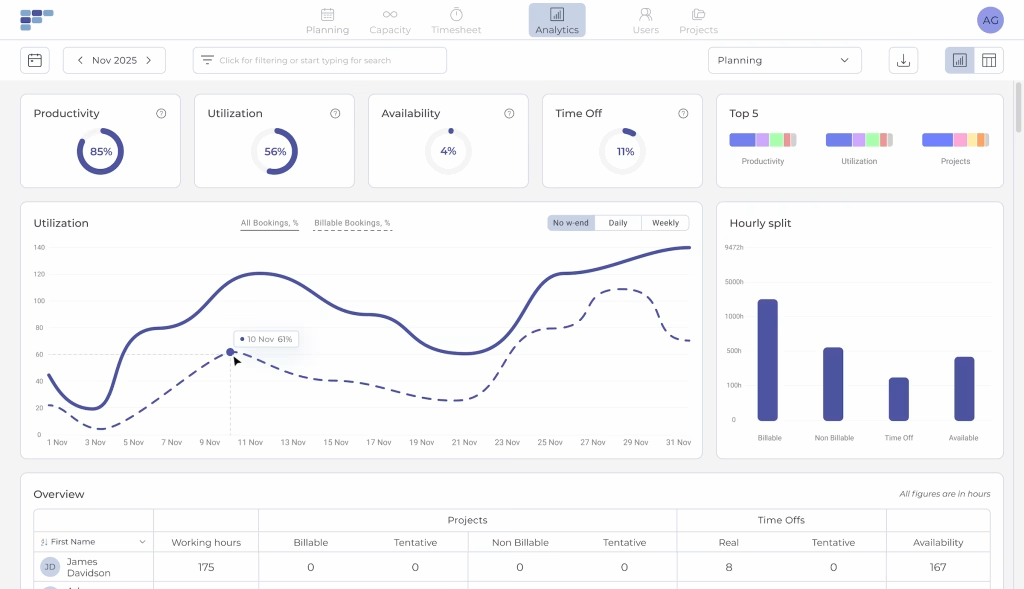
Compare planned hours to actual hours spent. See which projects are running over. Identify patterns - are certain project types consistently underestimated? Use real data to improve future planning.
"I really like calendar integration and Planner filters. We were previously using Excel sheets to plan and now Planning become much more efficient and painless with Teambook. At so low price the tool shows us a lot of great features!"
- Frank E
- Managing Director
Teambook works great with any industry managing projects at scale
Agencies
Juggling creatives, strategists, and account managers across multiple clients? Teambook shows you who's available, who's overloaded, and where every billable hour goes - so you can hit deadlines without burning out your team.
Consulting
Managing consultants across multiple client engagements? Teambook shows you who's billable, who's on the bench, and where you're at risk of overallocation - so you can keep clients happy and utilisation healthy.
Engineering & Construction
Coordinating engineers, draughtsmen, and site crews across multiple projects? Teambook shows you who's assigned where, how hours track against estimates, and where you're at risk of overruns - so you can protect margins and meet deadlines.
IT & Software
Managing developers and consultants across client projects and internal work? Teambook shows you who's billable, who has capacity, and how time is spent - so you can improve utilisation and keep customers informed.
Case Study
R&D Department in automotive industry
- 45 employees
- Munich
The Problem
- R&D department under pressure to justify resource allocation to top management
- Senior engineers previously assigned resources on an annual basis — too rigid for a dynamic environment
- Projects routinely ended up either overstaffed or critically under-resourced
- No reliable way to demonstrate the value or progress of internal initiatives
- Leadership visibility into R&D work was limited, making prioritization decisions difficult
Solution with TeamBook
- Teambook introduced to replace annual guesswork with structured weekly planning reviews
- Engineers gained clear visibility into their own schedules and workloads
- Dashboard surfaced over-planned projects in real time and imbalances became impossible to miss
- Resources proactively reallocated to understaffed initiatives before they fell behind
- Accurate time tracking created a factual record of effort invested in each project
The Result
The shift from annual to weekly planning wasn't just a change in cadence, it was a change in control. Project imbalances that had previously gone unnoticed for months were now visible within days, and resources could be moved before the damage was done. Teams that had been stretched too thin got reinforcement. Projects that had been over-resourced freed up capacity for higher-priority work.
Why teams choose Teambook
Intuitive from day One
One screen shows you who's working on what, who has room for more, and who's stretched too thin. Drag and drop to reassign work in seconds. No spreadsheet archaeology required.
Your data stays in Europe
Fully hosted in the EU. Meet GDPR requirements and internal compliance policies without compromise.
Pay by project, not by person
Add unlimited team members without watching costs spiral. Our pricing scales with your projects, not your headcount.
Fast updates
We ship updates fast. Your feedback today could be a feature next month - not next year.
Swiss precision, built to last
Designed and developed in Switzerland. Clean, reliable, and built with the precision you'd expect.
Real support in your language
Talk to real people who speak your language and understand your timezone. French, German, English, Italian, Spanish - we've got you covered.
Why teams choose Teambook
Intuitive from day One
One screen shows you who's working on what, who has room for more, and who's stretched too thin. Drag and drop to reassign work in seconds. No spreadsheet archaeology required.
Pay by project, not by person
Add unlimited team members without watching costs spiral. Our pricing scales with your projects, not your headcount.
Swiss precision, built to last
Designed and developed in Switzerland. Clean, reliable, and built with the precision you'd expect.
Your data stays in Europe
Fully hosted in the EU. Meet GDPR requirements and internal compliance policies without compromise.
Fast updates
We ship updates fast. Your feedback today could be a feature next month - not next year.
Real support in your language
Talk to real people who speak your language and understand your timezone. French, German, English, Italian, Spanish - we've got you covered.
Ready to plan, track, and forecast without the spreadsheet chaos?
Frequently asked Questions
What are the main functionalities of a resource management software for operational management?
A resource management software offers a number of essential functions, such as task planning, resource allocation and performance monitoring. It also allows you to view schedules, manage priorities and generate reports to optimise team efficiency.
How can a resource planning tool help optimise task planning for operational management?
The resource planning tool facilitates planning by enabling you to create detailed schedules, allocate the resources needed for each task, monitor progress and manage deadlines. It also offers real-time communication and notification functionalities to ensure effective coordination and avoid delays.
How does a resource management tool make it easier to monitor the performance of operational teams?
A resource management tool provides performance monitoring tools for operational management. It collects and analyses key data such as lead times and productivity. This information enables managers to assess team performance, identify areas for improvement and take corrective action to optimise results.
Does the resource management software make it easier for operational management to coordinate operations?
Yes, a resource management tool makes it easier to coordinate operations. It enables information to be centralised, schedules to be shared in real time and the progress of tasks to be monitored. This fosters collaboration between team members, improves visibility of operations and enables faster, more effective decision-making.
Are resource management tools suitable for all types of team?
Yes, resource management tools can be used by different types of team, whether they are managerial, operational or from any other field. Functionalities can be tailored to the specific needs of each team. This type of tool is also suitable for several types of industry, such as agencies, engineering and construction firms. Teambook is multi-project.
How do I choose the best resource management tool for my team?
It is important to consider the functionality offered, the user-friendliness of the interface, scalability, integrations with other tools and user feedback. A demonstration of the solution and an assessment of its relevance to the specific needs of your team can also be useful in the selection process.