





Track hours in seconds, bill with confidence.
One-click entry from planned schedules makes timesheet admin a thing of the past.
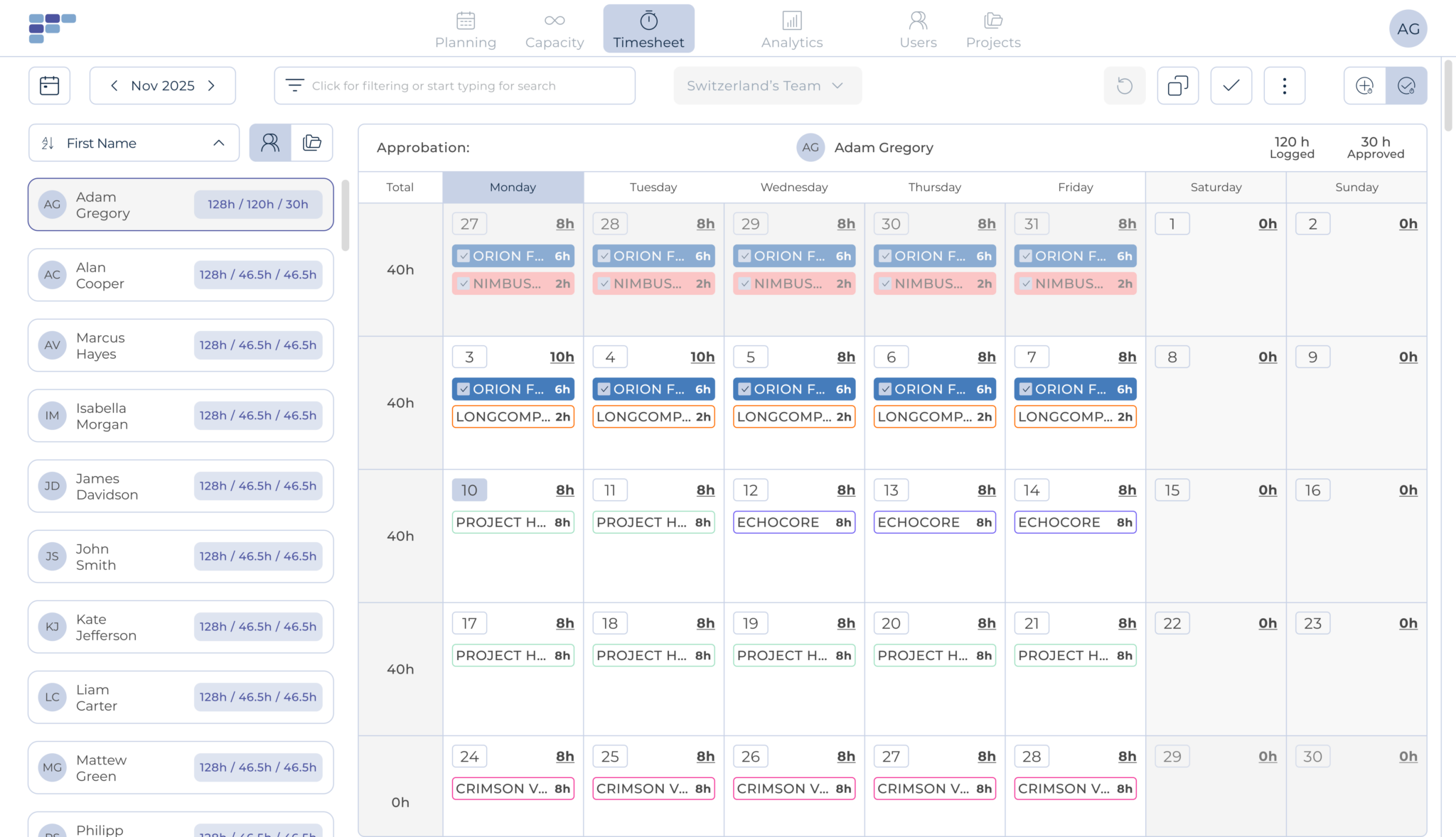
Time tracking made easier
Teambook's Timesheet module ensures that hours actually spent on projects are recorded, approved, and ready for invoicing. Your team logs time by week or month with minimal friction, so you get accurate data without the admin battle.
One-Click Time Entry
Log a full week in seconds
Forget manual entry. Teambook takes what was planned and turns it into a ready-to-submit timesheet. Your team just confirms the hours, notes any changes, and gets back to real work. Time tracking finally takes less time.
Detailed Tracking
Know exactly where time goes
Each team member, including subcontractors, can record hours by project in as much detail as you need. See time broken down by user or by project. Get the granularity required for accurate client billing and internal reporting.
Approval Workflow
Review, approve & export
Project managers and administrators can view submitted time across the team. With a simple click, approve entries and move them to invoicing. No hours get lost in the process, every minute is accounted for and ready for billing.
Automated Reminders
No more chasing people
Teambook sends automatic reminders to team members who haven't submitted their timesheets. You set the schedule, Teambook handles the nudging. Spend your Friday afternoons on something better than sending reminder emails.
What changes when planning is clear
Accurate Billing
Bill clients based on real hours, not estimates. Capture every minute of billable work.
Better Margins
See exactly where time goes. Identify projects that eat more hours than planned.
Happier Team
One-click timesheets mean less admin. Your team spends time on real work.



See how much is poor project resource planning costing you
Try our project resource calculator and find out how to optimize your resource management. Share your email and discover how Teambook can improve your topline.

Connected to your billing system
Export approved timesheets to feed your invoicing and accounting tools. Use Teambook's API or Zapier integration to connect with the systems you already use - no manual data transfer required.

Log time anywhere
Teambook's mobile apps for iOS and Android let team members submit timesheets on the go. Travelling, working remotely, or just away from the desk - hours get logged wherever work happens


“Finally, a simple, effective way to plan and track capacity! Ease and simplicity of use, fast adoption among my team (50 people), regular updates, efficient support (mainly for evolution as the product is very stable)”
- Stephane F
- IT Services
Make timesheets the easiest part of the week



Frequently asked Questions
What are the main functionalities of a resource management software for operational management?
A resource management software offers a number of essential functions, such as task planning, resource allocation and performance monitoring. It also allows you to view schedules, manage priorities and generate reports to optimise team efficiency.
How can a resource planning tool help optimise task planning for operational management?
The resource planning tool facilitates planning by enabling you to create detailed schedules, allocate the resources needed for each task, monitor progress and manage deadlines. It also offers real-time communication and notification functionalities to ensure effective coordination and avoid delays.
How does a resource management tool make it easier to monitor the performance of operational teams?
A resource management tool provides performance monitoring tools for operational management. It collects and analyses key data such as lead times and productivity. This information enables managers to assess team performance, identify areas for improvement and take corrective action to optimise results.
Does the resource management software make it easier for operational management to coordinate operations?
Yes, a resource management tool makes it easier to coordinate operations. It enables information to be centralised, schedules to be shared in real time and the progress of tasks to be monitored. This fosters collaboration between team members, improves visibility of operations and enables faster, more effective decision-making.
Are resource management tools suitable for all types of team?
Yes, resource management tools can be used by different types of team, whether they are managerial, operational or from any other field. Functionalities can be tailored to the specific needs of each team. This type of tool is also suitable for several types of industry, such as agencies, engineering and construction firms. Teambook is multi-project.
How do I choose the best resource management tool for my team?
It is important to consider the functionality offered, the user-friendliness of the interface, scalability, integrations with other tools and user feedback. A demonstration of the solution and an assessment of its relevance to the specific needs of your team can also be useful in the selection process.