





Know your team's capacity months ahead
Visualise and simulate your team's available capacity over the next 6 months to 2 years.
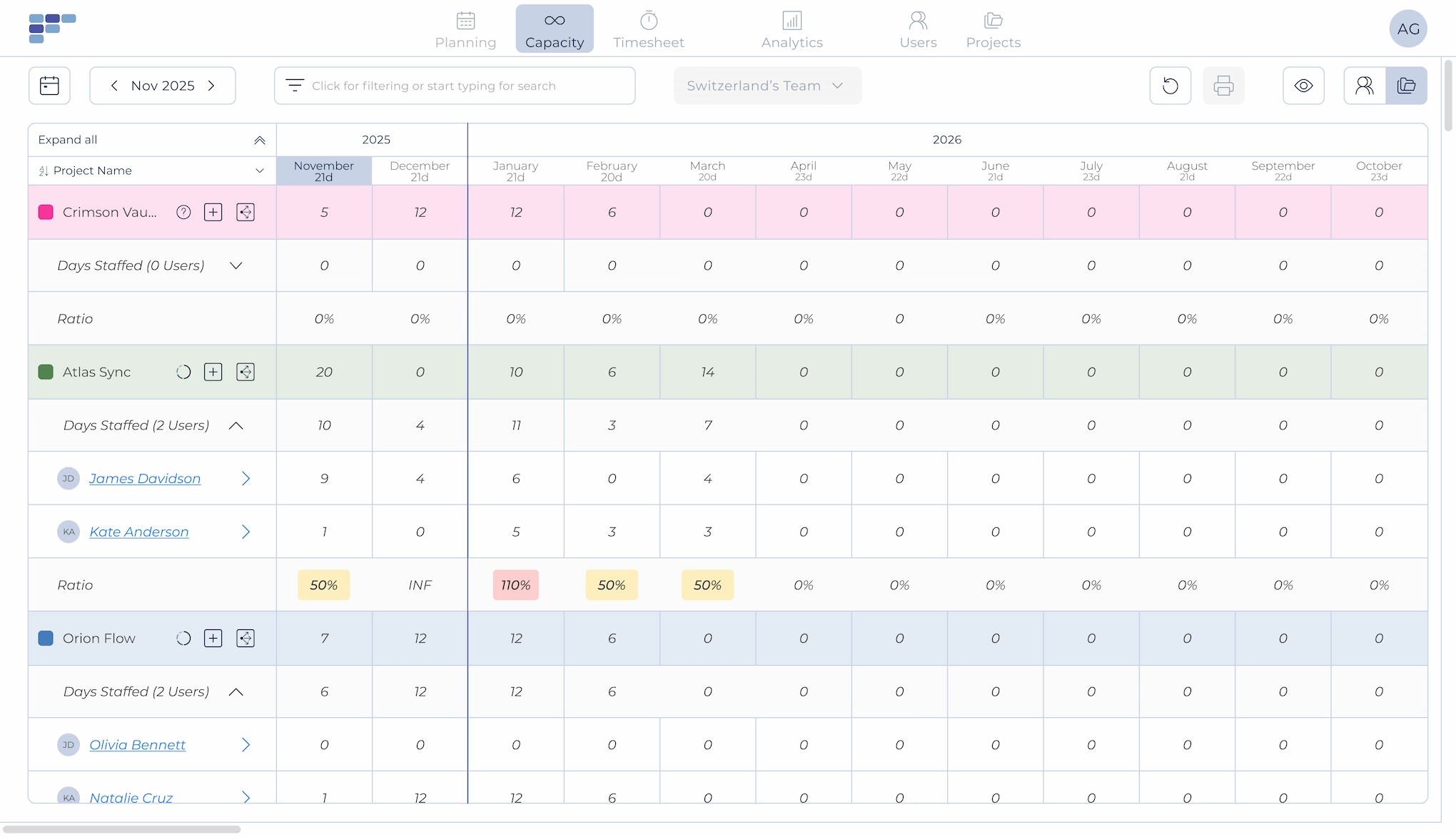
See the future of your team's workload
Teambook's Capacity Management module lets you visualise your team's available capacity, and the capacity needed to deliver your projects, over a 6-month to 2-year horizon.
See at a glance where you're over capacity, where you have room, and where the gaps are. Month by month, you can view discrepancies and take action before small imbalances become big problems.
Team Capacity View
See what your team can actually deliver
Map out your team's available capacity for the coming months. Account for holidays, part-time schedules, and other unavailabilities. Colour-coded indicators show you instantly where you're under or over capacity, so you can make informed decisions about hiring, redistribution, or project timing.
Project Demand View
Know what your projects actually need
Enter the capacity required for current and future projects, regardless of who's assigned yet. See total demand across your portfolio and compare it against your team's availability.
Allocation tools make data entry fast. Once complete, you can visualise resource capacity versus project demand side by side, and iterate until they align.
Reconciliation
Match supply to demand
Toggle between team capacity and project requirements to spot mismatches. Where is demand exceeding supply? Where do you have spare capacity? Teambook makes it easy to see the gaps and adjust. Whether that means redistributing work, delaying a project, or planning a hire.
Scenario Planning
What if you took on that new project?
Before you commit to new business, see what it would do to your team's capacity. Add a potential project to your forecast and instantly see whether you can deliver, or whether you'd be setting your team up for overload.
What changes when planning is clear
Confident Commitments
Say yes to projects you can actually deliver, and know when to push back.
Proactive Hiring
See capacity gaps months ahead. Start recruiting before you're desperate.
Balanced Workloads
Spot overallocation early. Redistribute work before burnout happens.



See how much is poor project resource planning costing you
Try our project resource calculator and find out how to optimize your resource management. Share your email and discover how Teambook can improve your topline.

Connected to your planning
Capacity Management can pull data directly from your operational planning in Teambook. No double entry, no syncing spreadsheets. Your day-to-day scheduling and your long-term forecasting live in one connected system.

“We can finally overview capacity of all employees in a pretty colorful and easy way. Automated system of tracking over-schedule and under-schedule. A pretty nice time tracking solution in one tool is also a plus”
- George P
- Engineering
Know your team’s capacity months ahead



Frequently asked Questions
What is capacity planning software?
Capacity planning software helps teams plan work based on real resource availability instead of assumptions. It gives a clear view of who is available, who is overloaded, and how future capacity will be used.
Read more about capacity planning software.
What are the main functionalities of a resource management software for operational management?
A resource management software offers a number of essential functions, such as task planning, resource allocation and performance monitoring. It also allows you to view schedules, manage priorities and generate reports to optimise team efficiency.
How can a resource planning tool help optimise task planning for operational management?
The resource planning tool facilitates planning by enabling you to create detailed schedules, allocate the resources needed for each task, monitor progress and manage deadlines. It also offers real-time communication and notification functionalities to ensure effective coordination and avoid delays.
How does a resource management tool make it easier to monitor the performance of operational teams?
A resource management tool provides performance monitoring tools for operational management. It collects and analyses key data such as lead times and productivity. This information enables managers to assess team performance, identify areas for improvement and take corrective action to optimise results.
Does the resource management software make it easier for operational management to coordinate operations?
Yes, a resource management tool makes it easier to coordinate operations. It enables information to be centralised, schedules to be shared in real time and the progress of tasks to be monitored. This fosters collaboration between team members, improves visibility of operations and enables faster, more effective decision-making.
Are resource management tools suitable for all types of team?
Yes, resource management tools can be used by different types of team, whether they are managerial, operational or from any other field. Functionalities can be tailored to the specific needs of each team. This type of tool is also suitable for several types of industry, such as agencies, engineering and construction firms. Teambook is multi-project.
How do I choose the best resource management tool for my team?
It is important to consider the functionality offered, the user-friendliness of the interface, scalability, integrations with other tools and user feedback. A demonstration of the solution and an assessment of its relevance to the specific needs of your team can also be useful in the selection process.