

Finding the right resource management software can make the difference between balanced workloads and constant firefighting.
Whether you’re running a consulting firm, agency, software company, IT services business, or professional services team, the right tool helps you plan resources, manage capacity, forecast demand, and keep projects staffed without overloading people.
In this guide, we compare the 15 best resource management software tools in 2026, including their strengths, limitations, and ideal use cases.
What Is Resource Management Software?
Resource management software helps organizations plan, allocate, and monitor people across projects.
Modern tools typically support:
- Resource scheduling
- Capacity planning
- Resource allocation
- Utilization tracking
- Demand forecasting
- Skills-based staffing
- Time tracking
- Reporting and analytics
The best platforms help managers understand who is available, who is overloaded, and whether future projects can be delivered with existing capacity.
Organizations looking to improve resource planning and capacity management often use dedicated tools instead of spreadsheets to gain real-time visibility across teams and projects.
How We Evaluated These Tools
To compare the tools fairly, we evaluated them based on:
- Resource scheduling capabilities
- Capacity planning features
- Forecasting functionality
- Utilization tracking
- Ease of use
- Reporting and analytics
- Integrations
- Pricing transparency
- Support for distributed teams
Resource Management Software Comparison
| Tool | Capacity Planning | Forecasting | Time Tracking | Resource Scheduling | Best For |
|---|---|---|---|---|---|
| Teambook | ✓ | ✓ | ✓ | ✓ | Resource planning |
| Float | ✓ | Limited | Optional | ✓ | Agencies |
| Runn | ✓ | ✓ | Limited | ✓ | Forecasting |
| Resource Guru | Basic | Basic | Limited | ✓ | Scheduling |
| TaskFord | Basic | Limited | ✓ | ✓ | Project execution |
| Kantata | ✓ | ✓ | ✓ | ✓ | Enterprise PSA |
| Monday.com | Basic | Basic | ✓ | ✓ | Work management |
| Smartsheet | Basic | Limited | Optional | ✓ | Spreadsheet users |
| BigTime | ✓ | ✓ | ✓ | ✓ | Professional services |
| Scoro | ✓ | ✓ | ✓ | ✓ | Operations management |
| Forecast | ✓ | ✓ | ✓ | ✓ | Enterprise teams |
| Teamdeck | ✓ | Limited | ✓ | ✓ | Utilization tracking |
| Hub Planner | ✓ | Limited | Optional | ✓ | Complex staffing |
| Paymo | Basic | Basic | ✓ | ✓ | Small teams |
| ClickUp | Basic | Basic | ✓ | ✓ | All-in-one PM |
1. Teambook
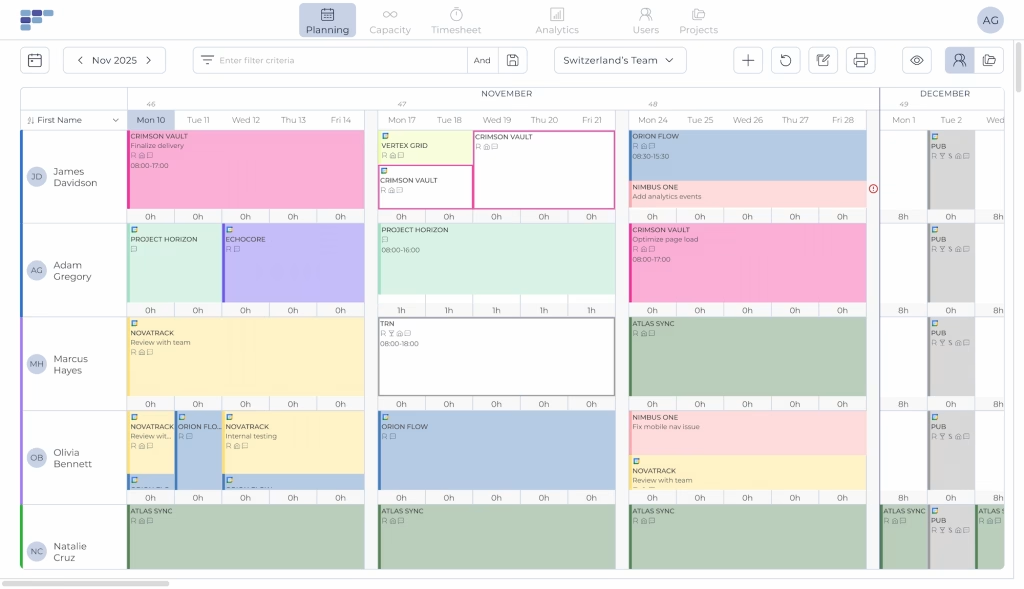
Teambook is a dedicated resource management platform designed for organizations that need visibility into team capacity, project staffing, utilization, and future demand.
Unlike broader project management tools, Teambook focuses specifically on helping managers allocate resources effectively across multiple projects. Its visual planning interface makes it easy to identify availability gaps, prevent overallocation, and forecast future staffing needs.
Key Features
- Resource planning
- Capacity management
- Timesheets
- Resource forecasting
- Utilization tracking
- Skills-based staffing
- Project allocation views
Pros
- Designed specifically for resource management
- Easy-to-use visual planning interface
- Strong capacity forecasting capabilities
- Supports distributed teams
- Unlimited users pricing model
Cons
- Less focused on task management than project management platforms
- May offer more planning functionality than very small teams need
Best For: Consultancies, agencies, software companies, IT services teams, and professional services organizations. Teambook is particularly well-suited for businesses managing multiple projects and shared resources, where visibility into capacity, utilization, and future staffing needs is critical for efficient planning and delivery.
2. Float
Float is one of the most widely known resource planning tools. It provides a clean scheduling interface and strong workload visibility.
Pros
- Easy scheduling
- User-friendly interface
- Strong agency adoption
Cons
- Forecasting is less advanced than some competitors
- Reporting can feel limited for larger organizations
Best For: Creative agencies and consulting teams.
3. Runn
Runn is a resource management and forecasting platform that helps organizations understand future project demand, revenue expectations, and team allocation trends. It provides visibility into upcoming work and resource requirements, helping managers make more informed planning decisions.
Pros
- Strong forecasting capabilities
- Revenue and project planning insights
- Clean interface
- Scenario planning features
Cons
- Smaller ecosystem than larger platforms
- Less flexible for non-project environments
- Reporting options may be more limited than some enterprise platforms
Best For: Professional services organizations focused on forecasting. It is particularly suited for teams that want better visibility into future project demand and business performance.
4. Resource Guru
Resource Guru emphasizes simplicity and ease of adoption. The platform focuses on helping teams schedule people, manage availability, and coordinate workloads without the complexity often found in larger resource management systems.
Pros
- Fast implementation
- Easy scheduling
- Minimal learning curve
- Intuitive user interface
Cons
- Limited advanced planning features
- Less sophisticated forecasting
- Fewer capabilities for complex resource planning requirements
Best For: Small to medium-sized teams. It is particularly well-suited for organizations looking for a simple scheduling tool without the need for advanced capacity planning, forecasting, or utilization management features.
Small to medium-sized teams.
5. TaskFord
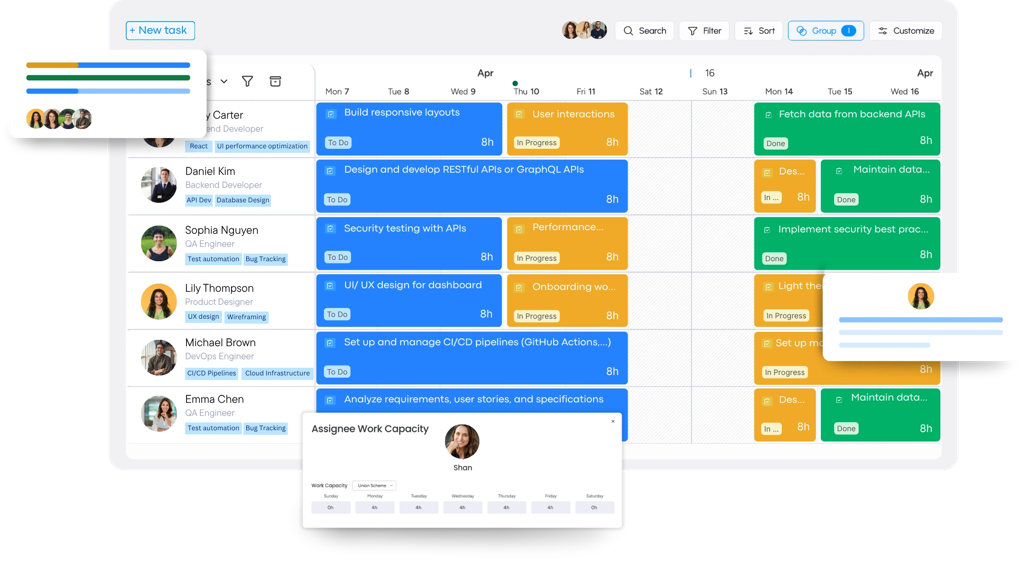
TaskFord is an integrated work delivery platform designed for teams that need visibility into projects, resources, workloads, and delivery timelines. Unlike traditional resource management tools, it combines project and task management, resource planning, time tracking, and collaboration in a single workspace, helping teams coordinate work across multiple projects and teams.
Key Features
- Multiple project views (Kanban, Gantt, Table, Calendar, and Scheduler)
- Resource planning and workload management
- Time tracking through timesheets or a built-in stopwatch
- Project and portfolio management
- Centralized workspace for cross-functional collaboration
- Customizable templates and checklists
- Team collaboration and document management
Pros
- Combines project, resource, and time management in one platform
- Multiple views support different workflows and planning styles
- Built-in workload management and time tracking
- Centralized workspace reduces the need for multiple tools
- Suitable for both project execution and operational planning
- Real-time visibility into project progress and team capacity
Cons
- Some advanced features are locked behind higher-tier plans
- Integration ecosystem is still expanding
- Advanced capabilities continue to evolve
Best For: Project managers, operations teams, agencies, marketing teams, startups, and growing businesses that need a flexible platform to organize work, improve team collaboration, and manage projects from planning to completion.
6. Kantata
Kantata (formerly Mavenlink) is designed for larger organizations that need visibility across projects, resources, budgets, and business performance. Its broad feature set supports complex service delivery environments, though implementation and administration can require significant time and expertise.
Pros
- Enterprise-grade functionality
- Advanced reporting
- Strong financial controls
- Comprehensive PSA capabilities
Cons
- Complex implementation
- Higher cost
- Steeper learning curve than simpler resource management tools
Best For: Large consulting and professional services organizations. It is particularly well suited for enterprises that need to manage resources, project delivery, financial performance, and operational processes within a single platform.
7. Monday.com
Monday.com’s large ecosystem of integrations and templates makes it a popular choice for organizations looking to manage multiple business functions from a single platform. While it includes resource management capabilities, its primary focus remains project execution, workflow management, and team collaboration.
Pros
- Highly flexible
- Strong ecosystem
- Broad functionality
- Extensive customization options
Cons
- Resource management is not the primary focus
- Can become complex at scale
- Setup may require ongoing administration for larger teams
Best For: Teams seeking a multipurpose work management platform. It works best for organizations that want to combine project management, workflow automation, collaboration, and reporting within a single system.
8. Smartsheet
Smartsheet combines spreadsheet familiarity with project and resource planning capabilities. Its grid-based interface makes it approachable for teams that have traditionally managed projects and resources in Excel but need more structure, automation, and collaboration features.
The platform supports project tracking, reporting, workflow automation, and resource management within a familiar environment. This makes it easier for organizations to modernize planning processes without completely changing how teams work.
Pros
- Familiar user experience
- Strong reporting
- Enterprise adoption
- Flexible workflow automation
Cons
- Can feel spreadsheet-heavy
- Resource planning requires setup
- Less intuitive than dedicated resource management tools
Best For: Organizations focused on Excel-based planning. It is a practical choice for teams that want more visibility, reporting, and collaboration while maintaining a spreadsheet-oriented approach to project and resource management.
9. BigTime
BigTime combines project management, resource planning, and financial tracking in a platform built for service-based organizations. The software helps teams manage projects, monitor resource allocation, track billable hours, and oversee financial performance from a single system.
Pros
- Strong billing capabilities
- Professional services focus
- Good reporting
- Project profitability tracking
Cons
- Interface can feel dated
- Learning curve for new users
- Some features require additional setup and configuration
Best For
Consultancies and accounting firms. It is often chosen by organizations that need to manage project delivery, billable work, and financial performance within the same platform.
10. Scoro
Scoro offers broad operational visibility, making it easier to connect project delivery with sales activities and financial performance. Because of its wide feature set, Scoro can reduce the need for multiple tools, though teams may need time to adopt and configure the platform fully.
Pros
- Broad business management capabilities
- Financial visibility
- Project tracking
- Combines CRM, project management, and operations tools
Cons
- Can be overwhelming
- Resource planning is only part of the platform
- Setup and configuration can take time
Best For: Service businesses managing operations and projects together. It is a strong option for organizations that want to connect project delivery, client management, and business operations within a single platform.
11. Forecast
Forecast combines resource management with AI-assisted planning to help organizations manage projects, resources, and operational workflows more efficiently. The platform uses automation and predictive capabilities to support project planning, scheduling, and resource allocation across teams.
Pros
- Forecasting features
- Automation capabilities
- Strong project visibility
- AI-assisted planning tools
Cons
- Enterprise-focused pricing
- Complex implementation
- May be more sophisticated than smaller teams require
Best For: Mid-sized and enterprise organizations. It is often used by businesses that want to combine project management, resource planning, and automation within a single platform while reducing manual planning processes.
12. Teamdeck
Teamdeck focuses on resource utilization and availability management, helping organizations understand how team capacity is being used across projects. The platform provides visibility into schedules, workloads, and resource allocation, making it easier to identify underutilized or overloaded team members.
Pros
- Strong utilization reporting
- Resource scheduling features
- Flexible reporting
- Clear visibility into team availability
Cons
- Less comprehensive than larger platforms
- Smaller ecosystem
- Fewer advanced business management features than PSA solutions
Best For
Organizations focused on workload balancing. It is a good fit for teams that want better visibility into utilization and resource availability without adopting a broader project or professional services management platform.
13. Hub Planner
Hub Planner offers advanced scheduling and resource allocation capabilities for organizations managing multiple teams, projects, and resource groups. The platform provides tools for planning workloads, assigning resources, and coordinating staffing across complex project environments.
Pros
- Flexible resource management
- Strong scheduling
- Customizable workflows
- Supports complex resource structures
Cons
- Interface can feel dated
- Reporting setup may require effort
- Some advanced features require additional configuration
Best For
Organizations with complex staffing requirements. It is commonly used by companies that manage multiple projects, departments, or resource pools and need greater flexibility in how resources are planned and assigned.
14. Paymo
Best for small service teams
Paymo combines project management, resource planning, and time tracking in a platform designed for smaller businesses and service-based teams. It provides tools for managing projects, scheduling work, tracking time, and monitoring team activity without the complexity of larger enterprise systems.
The platform focuses on ease of use and accessibility, making it a practical option for organizations that need basic project and resource management capabilities in a single solution. Its built-in time tracking features also help teams monitor effort and improve project visibility.
Pros
- Affordable pricing
- Built-in time tracking
- Easy onboarding
- Combines project management and resource planning
Cons
- Limited enterprise functionality
- Forecasting capabilities are basic
- Fewer advanced planning features than specialized platforms
Best For
Small agencies and service businesses. It works well for teams that want project management, time tracking, and resource planning in one platform without the complexity or cost of larger enterprise solutions.
15. ClickUp
ClickUp provides extensive project management functionality with resource planning features included. The platform combines task management, project tracking, collaboration tools, documentation, dashboards, and workflow automation within a highly customizable workspace.
Pros
- Extremely flexible
- Large feature set
- Strong customization options
- Supports a wide variety of workflows and use cases
Cons
- Can feel overwhelming
- Resource management is not its primary focus
- Initial setup can require significant configuration
Best For: Teams seeking an all-in-one platform. It is often chosen by organizations that want to consolidate project management, collaboration, documentation, and workflow automation into a single system.
Which Resource Management Tool Is Right for Your Team?
Agencies
Recommended:
- Teambook
- Float
- Paymo
Consulting Firms
Recommended:
- Teambook
- Kantata
- BigTime
IT Services Teams
Recommended:
- Teambook
- Tempo Planner
- Runn
Professional Services Organizations
Recommended:
- Teambook
- Kantata
- Forecast
Features to Look for in Resource Management Software
Before selecting a platform, look for:
Resource Planning
The ability to allocate people to projects and understand future availability.
Capacity Planning
Visibility into future workload and staffing requirements.
Time Tracking
Accurate tracking of project and non-project work through Timesheets.
Utilization Tracking
The ability to understand billable and non-billable workloads.
Forecasting
Tools that help predict future demand and hiring needs.
Skills-Based Staffing
The ability to assign the right people based on skills and availability.
Why Teams Choose Teambook
Many resource management platforms add planning features to broader project management systems.
Teambook takes the opposite approach. It focuses on helping organizations plan resources, manage capacity, forecast demand, and allocate people effectively across projects.
For teams looking to improve Planning, Capacity Management, and Timesheets without adopting a complex PSA platform, Teambook provides a focused and easy-to-use solution.
Final Verdict
The best resource management software depends on your organization’s priorities.
If you need a dedicated platform focused on resource planning, forecasting, and capacity management, Teambook is one of the strongest options available.
If you’re already committed to Jira, Tempo Planner may be the right choice. Agencies often prefer Float, while large professional services organizations may benefit from Kantata or BigTime.
The most important factor is choosing a solution that gives your team clear visibility into capacity, workload, utilization, and future demand, allowing you to make better staffing and planning decisions.