Teambook allows you to:
- Plan and allocate your human resources visually: Get an overview of your consultants’ workload and quickly find available talent
- Save time on projects, increase employee utilization, and boost your company’s profitability.
- Analyze your capabilities for the period ahead: By abandoning forecasting, become a planning superhero.
- Benefit from a Swiss system, a guarantee of quality, precision and security, because your data is not stored abroad.
- Save money compared to competitors because pricing is based on the number of projects rather than users.
- Facilitating onboarding because the software is extremely simple, intuitive and fast.
- Working in most languages (French, German, Italian, Spanish and of course English) with a multilingual and efficient customer service.
If you’re looking for a solution to improve your team’s planning and resource allocation, you can explore how Teambook capacity planning software supports real-world teams.
2. Runn – Capacity planning for IT services
Project managers, operations managers, and resource managers were the primary designers of Runn, a free, high-tech resource management application. This application helps people understand your capacity management because it is truly visual and engaging.
A bird’s-eye view calendar allows users to monitor all projects and resources simultaneously, making it easier to detect double bookings and resource risks. In addition to high-level capacity statistics, you can examine individual team members to see how they are being utilized, including in real time. This involves tracking the time a worker spends on billable and non-billable tasks.

Runn ‘s capacity diagrams are also a valuable resource if you want to make the most of your resources. They show the planned workload for your resources in relation to the time available. So you can quickly determine where you can add resources to maintain a fair workload for all employees, and where you still have capacity to use. Charts can be organized according to the desired time period, and you can apply unique labels to filter data according to teams, roles, skills and other relevant factors.
Runn is another unique tool that gives you financial control over your project.
3. Toggl – View your team’s schedule
Toggl ‘s aim is to enable project managers to make the best possible use of employees and resources, while avoiding overloading them. Primarily designed for agencies, Toggl makes it easy to track employee time spent on projects, so you can identify ways to improve employee productivity and bill your customers for every team effort made.

It is also designed for remote teams, enabling customizable sharing of calendars and projects with customers. Drag-and-drop calendars create visual roadmaps for specific projects and resources, and flexible tasks can be created with as much or as little information as required.
4. Float – Improving capacity management in creative agencies
As well as being an excellent tool for capacity management and planning, Float gives individuals and teams working on projects visibility and understanding.
To ensure universal project visibility across all departments, titles and functions can be assigned to teams and their members. In addition, you can customize availability and define default working hours for each person, improving communication between all project stakeholders.
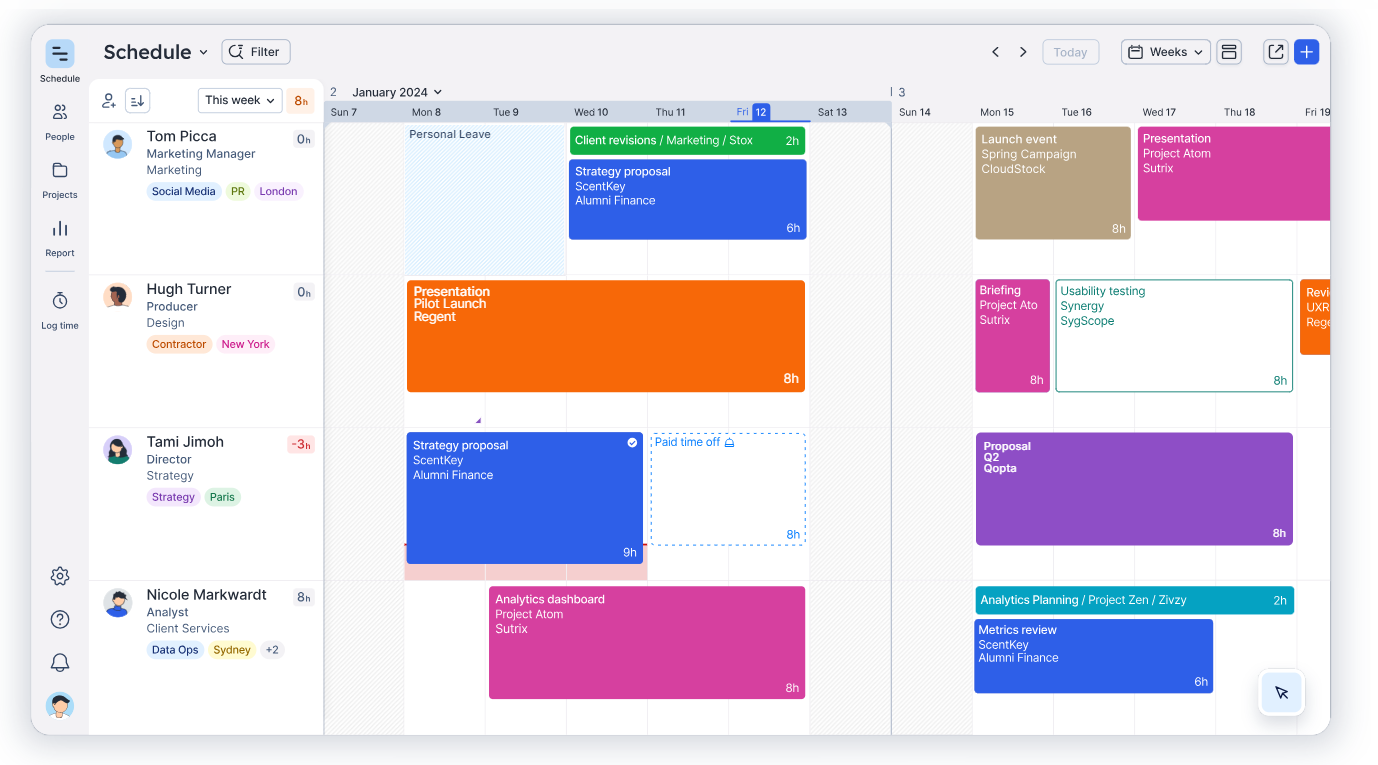
Capacity planners can also easily detect skill or resource gaps in advance, facilitating advance hiring and outsourcing.
Float offers a free trial and only subscription services, although it connects to popular work apps such as Slack and Asana.
5. Resource Guru – Comprehensive resource planning
Resource Guru offers a range of premium plans to help you manage more than just human resources. It lets you know which team members are under-utilized or which staff are in demand.
Features include calendar visibility for all team members and departments, scheduling conflict alerts to avoid last-minute compromises, and an integrated leave management system for vacation planning.

In short, Resource Guru gives you an overview of the availability of all your teams, enabling you to identify cases of under-capacity and make the most of your resources immediately.
To make informed decisions and set reasonable expectations for your potential projects, you can filter your staff by location, department and level of expertise. What’s more, you can constantly monitor utilization rates to determine whether your workforce needs to be adjusted.
Resource Guru is an excellent tool for managing employee schedules due to its calendar views and simplicity, but companies tend to quickly outgrow it when looking to add other functionality to their technology stacks, such as project budget management or more advanced project planning capabilities.
The monthly cost of the basic plan is $6 per user.
6. 10,000ft by Smartsheet – For simple resource allocation and planning
Workplace cooperation software. Excellent capacity planning software was produced following Smartsheet’s 2019 acquisition of 10,000 ft, a SaaS capacity planning startup.
It offers accurate pipeline estimates, pre-filled timesheets that allow employees to easily report their working hours, and direct resource allocation that allows project managers to choose the best team or person for a given job.

With this program, users can always record and control their plans, resources and schedules, enabling new working methods to be developed. It helps to accurately estimate hiring needs and maintain the efficiency of all processes.
Similar to Toggl, it allows your resources to record their working hours so you can control how they use their productive hours and bill your customers accurately. Smartsheet simplifies things for users by providing pre-filled timesheets with an easy-to-use interface, so you can get started without any prior training.
To generate uniform, direct project updates and communication, Smartsheet also connects to other CRM and workplace communication applications.
7. Mavenlink – designed for resource management
Mavenlink makes capacity planning fast and easy by connecting people and providing efficiency and information. It presents itself as innovative, up-to-date and aware of the needs of today’s project managers.
Users can immediately see staffing requirements for the foreseeable future, and add resources to projects as needed. Real-time visibility of budgets, expenses, resources and schedules is ensured by up-to-the-minute perspectives. At the click of a button, users can act and make significant changes with a high degree of control.

However, Mavenlink and Kimble have recently merged to form Kantata, which means greater impact and capacity. Using both firm and flexible assignments, the tool helps you forecast capacity and ensure that supply and demand for your resources are constantly in balance. As a result, it will help you reduce recruitment lead times and facilitate rapid response times.
8. Saviom – Detailed capacity reports and demand planning
Like many other capacity planning software packages, Saviom provides real-time and prospective visualizations of resource consumption to improve planning. Users are able to plan ahead for periods when resources will not be available, reserve resources when they are needed, and monitor demand for specific resources.

Saviom includes features that adapt to changing conditions, giving it an edge over competing capacity planning tools. If necessary, users can modify schedules, retrain staff and increase headcount; Saviom helps them determine when these and other emergency measures are required.
9. Birdview PSA – All-in-one capacity planning software for professional services companies
For service delivery teams, Birdview PSA is a comprehensive solution that integrates powerful resource, project and financial management functions into a single, centralized platform. Thanks to sophisticated capacity planning tools, your managers can detect and resolve team underload, and always find the right person for the job, to maximize the use of your resources in real time.

You can effectively predict your future resource needs and meet deadlines by using Birdview PSA to create relevant BI reports that account for changes in team schedules and project timelines. You can use these reports to inform all your resource decisions and determine whether you have sufficient resources to complete current tasks or take on new ones.
10. Forecast – Project management and capacity planning in one tool
Capacity planning is a new addition to Forecast‘s comprehensive suite of PSA software . It can be a smart choice if you’re looking for a tool to manage projects and activities related to your creative agency work, as well as resource planning and financial management. Forecast facilitates work allocation and interaction between different functions, making it ideal for professional services firms with more than fifty employees.

According to a recent press release, the new key components of capacity planning are as follows:
- Reserved spaces allow for the allocation of resources without requiring the services of a specific individual.
- AI-powered recruitment recommendations based on job title, talent, and availability
- Gradual allocations allow you to reserve the desired resources in advance.
- The probability of winning is included in the capabilities overview to show the chances of a project’s success and the impact on resources.
Which capacity planning software should you choose?
There is no single “best” capacity planning software for every team. The right choice depends on how your organization works, how complex your planning needs are, and how your resources are structured.
Instead of focusing on features alone, the goal is to choose a tool that fits your workflow and helps you make better planning decisions on a daily basis.
How to choose the right capacity planning software
Choosing the right tool becomes easier when you focus on a few key criteria.
Your planning needs
Start by defining what you actually need to solve. Do you want better visibility on team workload, more accurate forecasting, or a way to coordinate multiple projects?
Avoid overcomplicating your setup. A tool should support your planning process, not add unnecessary complexity.
Team size and complexity
Smaller teams with simple workflows can often work with lightweight tools. However, as soon as you manage multiple projects, shared resources, or shifting priorities, more advanced planning capabilities become necessary.
The more complex your organization, the more important it is to have a clear and centralized view of capacity.
Ease of use
A capacity planning tool is used daily. If it is difficult to understand or time-consuming to update, teams will stop using it.
Look for tools that offer:
- clear visual planning
- intuitive navigation
- fast resource allocation
Ease of use has a direct impact on adoption and long-term value.
Flexibility and scalability
Your planning needs will evolve. A good tool should be able to grow with your organization, whether that means handling more users, more projects, or more complex workflows.
Choosing a scalable solution avoids having to switch tools later.
Integrations and workflow fit
Capacity planning does not exist in isolation. Your tool should integrate smoothly with your existing stack, such as project management, CRM, or time tracking tools.
This ensures that your data stays consistent and your teams don’t have to duplicate work.
Cost vs value
The cheapest option is not always the most efficient. Consider the time saved, the reduction in planning errors, and the improved utilization of your team.
In many cases, a dedicated tool quickly pays for itself through better planning and fewer inefficiencies.
How to choose based on your use case
If you’re still unsure, here’s a simple way to decide:
- Small teams or simple planning needs → lightweight tools or time tracking solutions
- Agencies and project teams → visual resource planning tools with strong allocation features
- Complex organizations or enterprise teams → advanced tools with forecasting, reporting, and scenario planning
Choosing a tool that matches your actual use case is more important than choosing the one with the most features.
Key takeaway
Capacity planning software has become essential for teams managing multiple projects and shared resources. It helps improve visibility, balance workloads, and make better decisions.
As planning becomes more complex, many teams move away from spreadsheets and adopt dedicated tools that provide a clearer and more reliable view of their capacity.
If you want to see how this works in practice, you can explore how Teambook capacity planning software helps teams plan, allocate, and optimize their resources more effectively.
To delve deeper into this transition, discover the comparison between Teambook and Excel and how to move from a spreadsheet to dedicated planning software.